



Description
REHub v19.9.9.6 – Price Comparison, Multi Vendor Marketplace
Within the dynamic sphere of digital commerce and content fusion, **ReHub** stands as a remarkably intricate construct—a hybrid theme that refuses to be confined to a single identity. It seamlessly interlaces the realms of magazine, shop, review hub, and news portal, forming a multifaceted platform where information and monetization co-exist in calculated harmony.
At its core, ReHub thrives on versatility. It accommodates multi-vendor ecosystems, empowers user-generated submissions, and integrates fluidly with tools like Easy Digital Downloads, bbPress, eCWID, and an extended WooCommerce framework. The result is not just a website, but a living marketplace—one that evolves through interaction, contribution, and transactional flow.
What distinguishes ReHub is its deliberate convergence of content and commerce. It is not merely built for display; it is engineered for profitability. Whether you are constructing a comparison engine, a review-centric portal, or a digital storefront, the theme provides an arsenal of monetization pathways. Affiliate systems, advertising placements, and commission-driven structures are woven into its very fabric, enabling site owners to extract value from multiple directions simultaneously.
The design language leans toward modernity, yet it avoids becoming sterile. Clean visual hierarchies meet functional density, allowing complex data—such as product comparisons or deal aggregations—to remain digestible. It’s a delicate balance, akin to orchestrating noise into rhythm.
ReHub also embraces the evolving nature of web interaction. With front-end posting capabilities, users can contribute directly, enriching the platform with fresh perspectives and content. Multi-vendor support further expands this ecosystem, transforming a single site into a collaborative commercial arena where sellers, reviewers, and consumers intersect.
Performance and technical finesse are not overlooked. Built-in schema markup ensures enhanced visibility in search engine snippets, while AMP compatibility accelerates mobile experiences to near-instant responsiveness. There is no reliance on external schema plugins—the intelligence is embedded natively. Speed, often a silent determinant of success, is handled with precision, earning commendable optimization scores and delivering swift load times that keep engagement intact.
Monetization opportunities extend beyond conventional banners. Strategic ad placements—within content streams, sidebars, and transitional spaces—allow revenue generation to feel organic rather than intrusive. Combined with discount systems, deal mechanisms, and affiliate integrations, the theme becomes a finely tuned revenue engine.
Included within the package are powerful tools such as WPBakery Page Builder, Revolution Slider, and advanced product filtering systems, each contributing to a richer, more controlled user experience. These elements work in quiet cohesion, enabling both aesthetic customization and functional depth.
—
In its entirety, ReHub is less a theme and more a digital marketplace blueprint—crafted for those who seek not just presence, but performance. For affiliate marketers, eCommerce strategists, and content entrepreneurs alike, it offers a rare blend of adaptability and earning potential, making it a formidable contender in the modern WordPress landscape.,
Important Features Of REHub – Multi-Purpose Hybrid WordPress Theme
Optimized for search engines
Rich snippets added by default
Multi-store features also included
Some premium plugins are also added to the theme package
Advanced WordPress functions
Product comparison feature
Optimized for Gutenberg editor
Front-end controls
Social login or register options
Pre-designed demos
Mobile optimized
Site width control options
Price drop widget
Modern and clean design
Lightweight codes
Paid membership system also included
Geo My WordPress plugin support for store locator
Advanced search filters
Custom tables support
AMP support for mobile users
Special post layouts
Member type system
Responsive tables
Advanced rating system
Amazing page loading speed
Allows to disable unused features or blocks
Updates & Support
Updates:
-
If you purchase a product individually, you will receive 10 downloads per product, along with one year of future updates. After one year, the digital product files will no longer be accessible. If you use all 10 downloads within the one-year period, simply contact us and we will increase your download limit.
Note: This download limit is in place to maintain server performance and prevent unnecessary load or spam.
- We regularly update our products as soon as new versions are released. Once we are notified of an update, we download it directly from the author and upload the latest version to our website. However, if you find that a product is not up to date, you can request an update through our contact us page.
Support:-
- If you have any questions or need assistance with installing or configuring any digital products purchased from our website, feel free to contact us.
- Please note that we are not the original developers of these products, so our technical support is limited. We do not modify product functionality or resolve issues related to developer-side bugs.
WHY SO AFFORDABLE?
- All WordPress items, including themes and plugins, are licensed under the General Public License (GPL). This license allows redistribution once the product has been legally purchased.
- Your purchase helps us maintain our platform and acquire new products from third-party theme and plugin developers. This community-driven funding model keeps our costs low, allowing us to pass significant savings on to you.
- Please note that our products do not include premium developer support, which is why we are able to offer discounts of up to 95% on popular commercial WordPress themes and plugins.
HOW TO INSTALL/UPDATE?
How to Install/Update WordPress Themes/Plugins manually?
Click to watch Video Tutorial
Step 1: Purchase the product and download the ZIP file.
Note: Some ZIP files may need to be extracted before uploading.
If you are updating an existing theme or plugin, install the latest version and WordPress will automatically replace the older one. All your existing settings and customisation will remain unchanged.
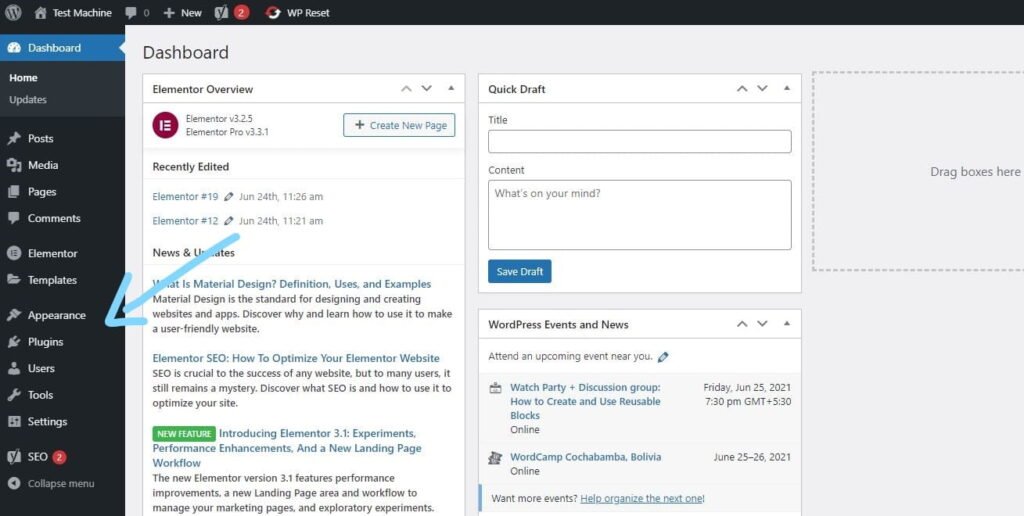
Step 2: From your WordPress dashboard, go to Appearance → Themes if you’re installing a theme, or navigate to Plugins if you’re installing a plugin.
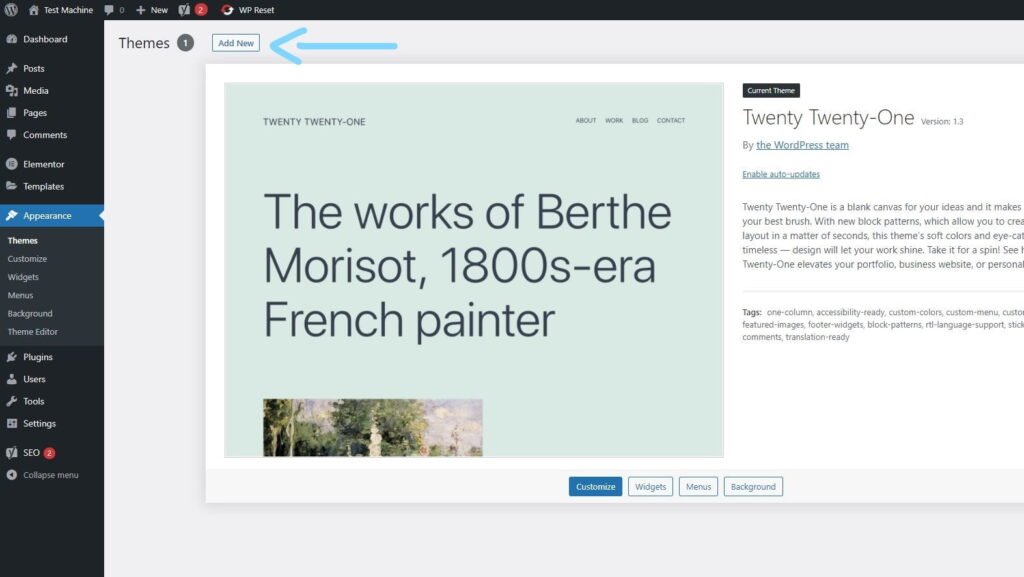
Step 3: Click the “Add New” button (this option is the same for both themes and plugins).
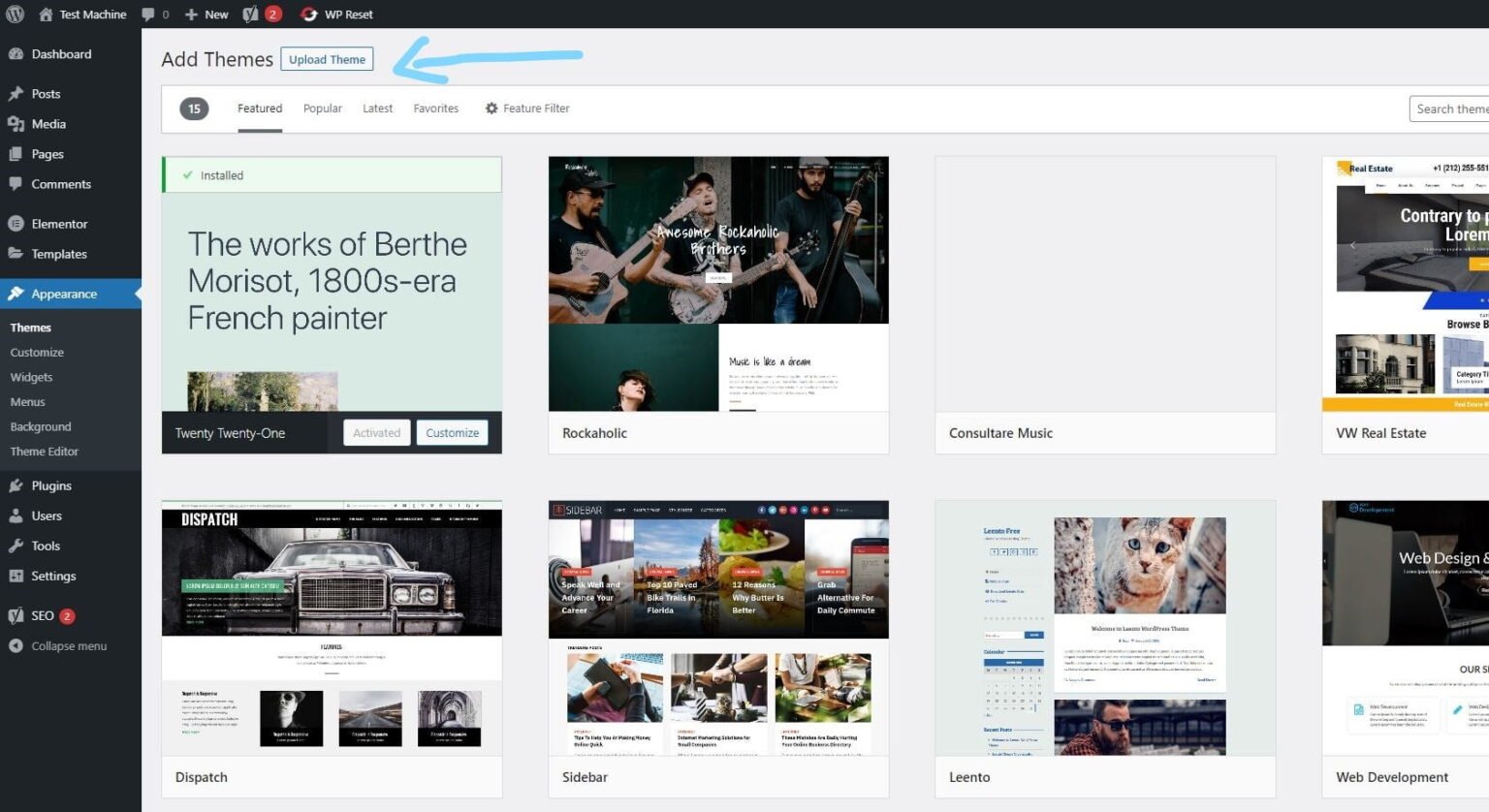
Step 4: Click “Upload Theme” if you’re installing a theme, or “Upload Plugin” if you’re in the plugins section.
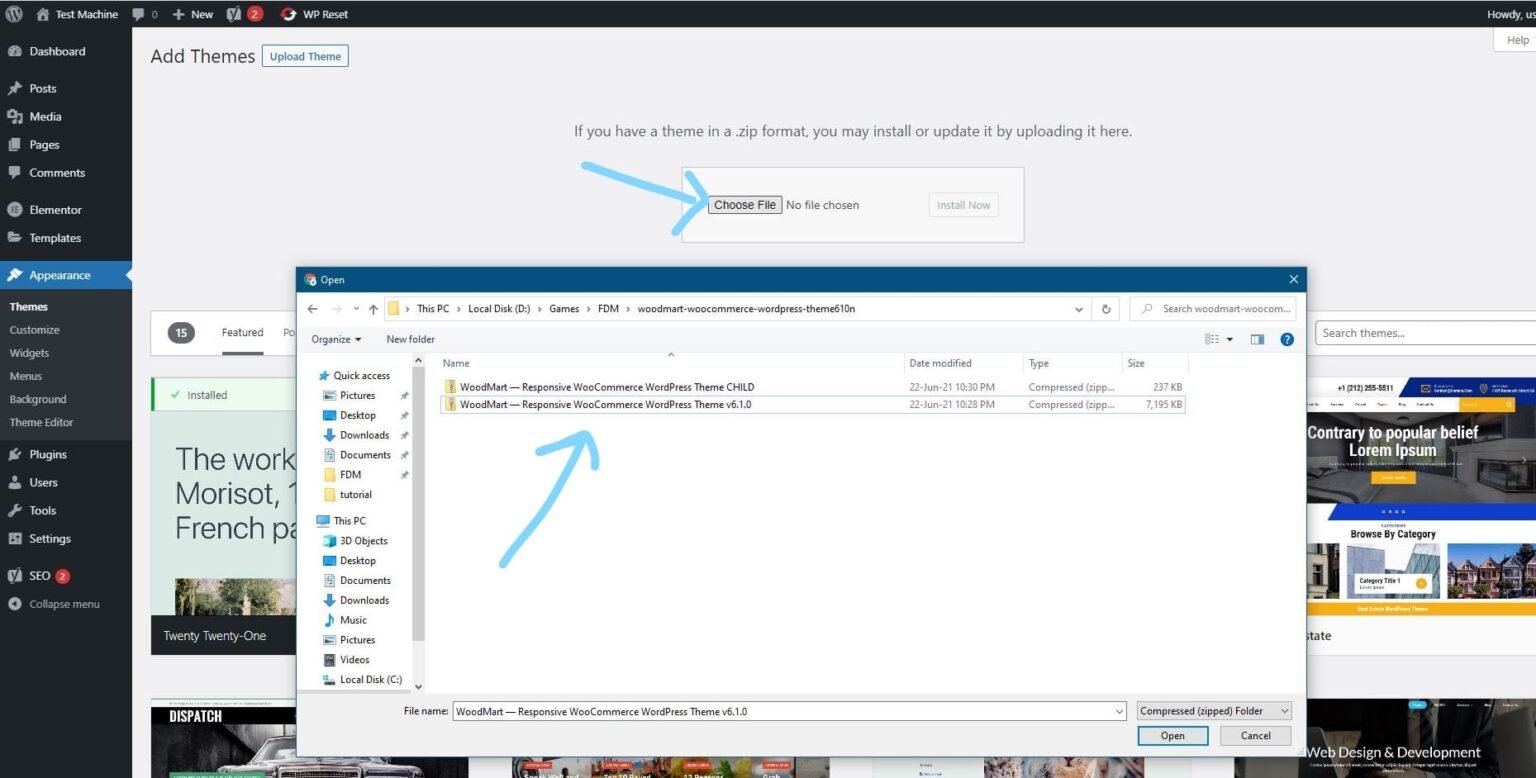
Step 5: Click “Choose File” and select the ZIP file of the theme or plugin you want to install.
Step 6: Click “Install Now.”
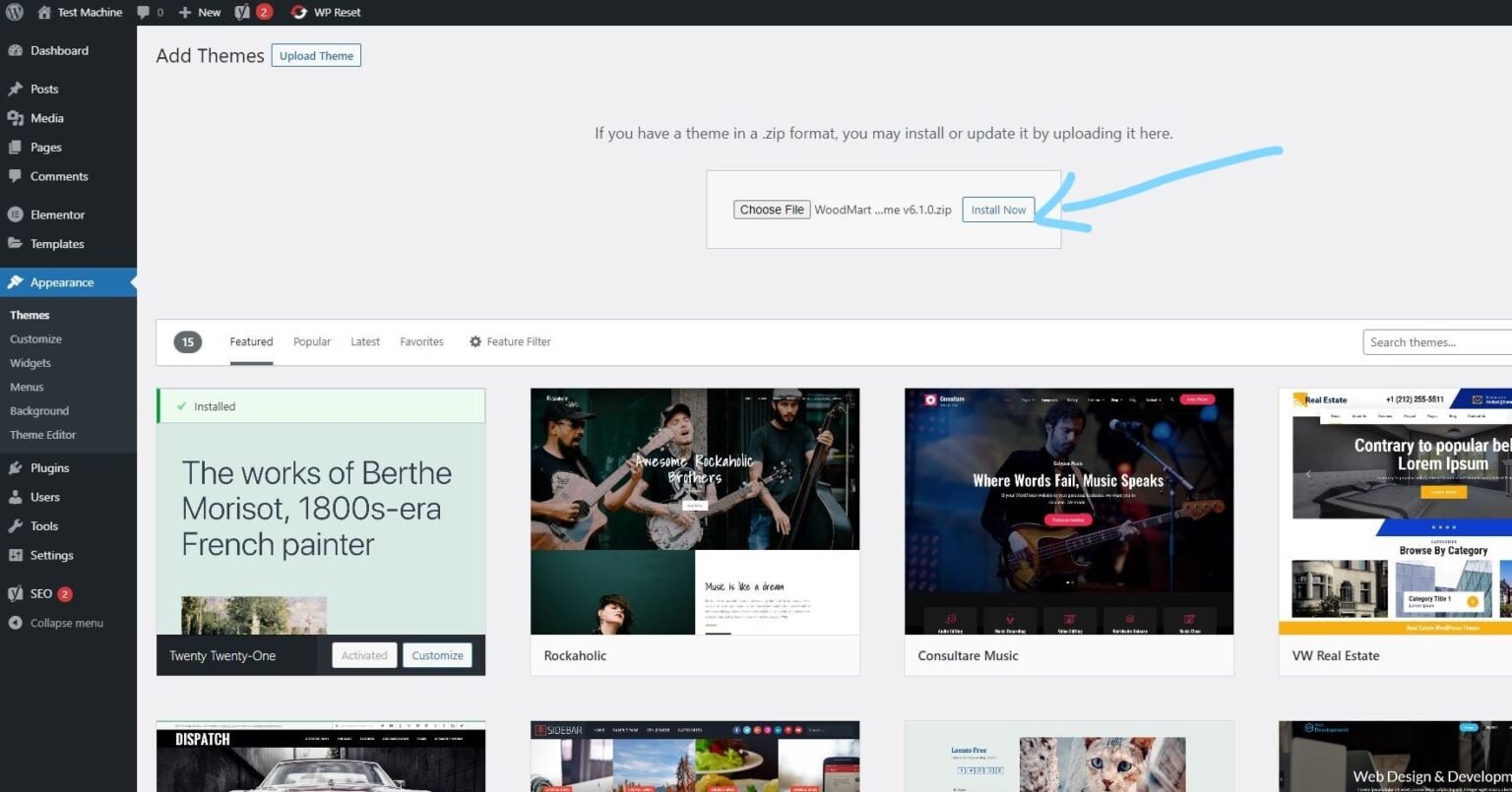
Step 7: The installation process will take a few seconds to complete.
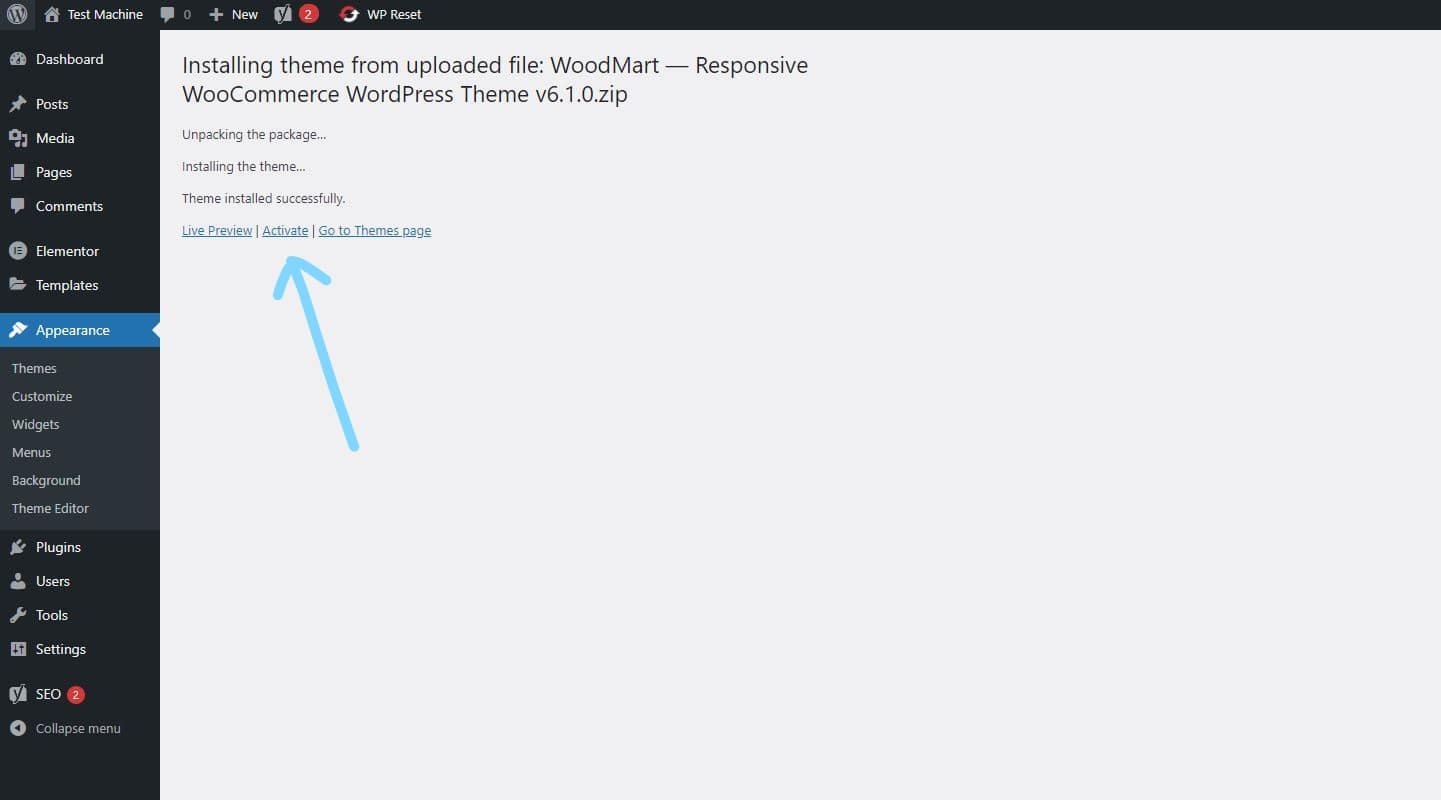
Step 8: Once the installation is complete, click “Activate” to manually activate your WordPress product.
How to Install Elementor Template Kits
Step 1: Download your template kit ZIP file. Do not unzip it.
Step 2: In WordPress, go to Settings → Permalinks and make sure Post Name is selected, then click Save.
Step 3: Navigate to Appearance → Themes → Add New and ensure Hello Elementor is installed and activated.
Step 4: If the theme prompts you to install the Elementor Page Builder plugin, click Install and then Activate.
Step 5: Go to Elementor → Settings, click the Features tab, and ensure the Flexbox Container shows a green icon. If not, set it to Active.
Step 6: Navigate to Plugins → Add New, search for Envato, and install and activate the Envato Elements – Photos & Elementor Templates plugin.
Note: If your kit requires Elementor Pro, make sure it is installed before continuing.
Step 7: Go to Elements → Installed Kits and click Upload Template Kit ZIP File. Your templates will now appear.
Step 8: Look for the orange banner at the top of the screen and click Install Requirements to load the necessary kit addons and settings.
That’s it! You’re now ready to start building your site.
-
Imported templates are stored in Elementor → Templates → Saved Templates and must be inserted into a new page in WordPress before customisation.
-
Imported blocks, tabs, or slides are also stored under Templates → Saved Templates and can be duplicated and customized directly.
-
Elementor Pro site parts are stored under Templates → Theme Builder and can be customized directly.
For detailed, step-by-step instructions with screenshots, copy and open the link below in a new tab.
How to Upload Install Elementor Template Kits from Themeforest to WordPress




Reviews
There are no reviews yet.