



Description
Moddroid v7.1 – Best Mod APK Android WordPress Theme
In the niche yet rapidly expanding sphere of APK-focused platforms, the **Moddroid WordPress Theme** emerges as a specialized instrument—crafted to streamline the creation and management of app-centric websites with striking efficiency. It is not merely a theme; it behaves as a hybrid mechanism, blending plugin functionality with visual presentation to form a cohesive, automation-driven system.
At its core, Moddroid is designed to eliminate the tedious rituals traditionally associated with APK publishing. The process, once burdened by repetitive copy-paste routines, is distilled into a few concise steps. With minimal intervention, users can populate their websites with hundreds—even thousands—of APK listings, transforming what was once labor-intensive into something almost instantaneous.
What lends this theme its distinct identity is its automation-centric philosophy. Content generation can occur either manually, for those who prefer precision, or automatically, for those seeking scale. This duality provides flexibility—allowing creators to balance control with efficiency depending on their strategy.
—
### **A System Built for Scale and Simplicity**
The theme integrates advanced extraction capabilities, enabling users to gather APK data from multiple sources, including the Google Play ecosystem. This automated retrieval mechanism acts like a silent assistant, collecting and organizing content behind the scenes.
Equally compelling is its intelligent categorization system. Rather than requiring manual sorting, the theme autonomously generates categories and assigns content accordingly. This not only saves time but ensures structural consistency across the platform.
Download management is handled with notable sophistication. Dedicated download pages can be created effortlessly, complete with dynamically generated links that refresh periodically—adding a layer of control and protection against unauthorized usage.
—
### **Feature Highlights – Precision Meets Automation**
* **Responsive & Mobile-Optimized Design**
Ensures seamless viewing across devices, maintaining visual clarity and usability.
* **Automatic Content Generation**
Populate your site with APK listings instantly or refine them manually for a curated approach.
* **Smart Download System**
Dynamic links that update automatically, safeguarding content access and enhancing control.
* **SEO-Conscious Framework**
Structured to improve search visibility, allowing content to surface more effectively.
* **AdSense Readiness**
Built-in monetization compatibility, enabling strategic placement of advertisements.
* **Featured Apps & Games Widgets**
Highlight trending or curated content with visually engaging sections.
* **Integrated Navigation Enhancements**
Breadcrumbs, numbered pagination, and categorized layouts improve user flow.
* **Social Sharing Capabilities**
Facilitate effortless distribution across social platforms, extending reach organically.
—
### **Performance and User Experience**
Despite its extensive automation, Moddroid maintains commendable speed. Pages load swiftly, interactions remain fluid, and the overall experience feels cohesive rather than cluttered. Visitors can browse, explore, and download with minimal friction—an essential trait for content-heavy platforms.
—
In essence, the Moddroid WordPress Theme is more than a publishing tool—it is an automated content engine. It empowers users to construct APK-centric websites with remarkable speed and scale, blending efficiency with functionality in a way that transforms complexity into simplicity.
Updates & Support
Updates:
-
If you purchase a product individually, you will receive 10 downloads per product, along with one year of future updates. After one year, the digital product files will no longer be accessible. If you use all 10 downloads within the one-year period, simply contact us and we will increase your download limit.
Note: This download limit is in place to maintain server performance and prevent unnecessary load or spam.
- We regularly update our products as soon as new versions are released. Once we are notified of an update, we download it directly from the author and upload the latest version to our website. However, if you find that a product is not up to date, you can request an update through our contact us page.
Support:-
- If you have any questions or need assistance with installing or configuring any digital products purchased from our website, feel free to contact us.
- Please note that we are not the original developers of these products, so our technical support is limited. We do not modify product functionality or resolve issues related to developer-side bugs.
WHY SO AFFORDABLE?
- All WordPress items, including themes and plugins, are licensed under the General Public License (GPL). This license allows redistribution once the product has been legally purchased.
- Your purchase helps us maintain our platform and acquire new products from third-party theme and plugin developers. This community-driven funding model keeps our costs low, allowing us to pass significant savings on to you.
- Please note that our products do not include premium developer support, which is why we are able to offer discounts of up to 95% on popular commercial WordPress themes and plugins.
HOW TO INSTALL/UPDATE?
How to Install/Update WordPress Themes/Plugins manually?
Click to watch Video Tutorial
Step 1: Purchase the product and download the ZIP file.
Note: Some ZIP files may need to be extracted before uploading.
If you are updating an existing theme or plugin, install the latest version and WordPress will automatically replace the older one. All your existing settings and customisation will remain unchanged.
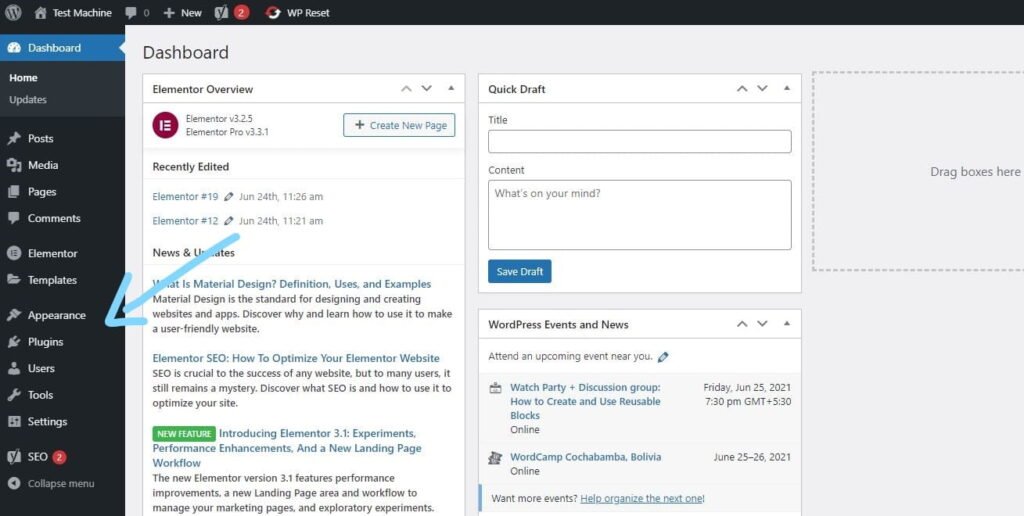
Step 2: From your WordPress dashboard, go to Appearance → Themes if you’re installing a theme, or navigate to Plugins if you’re installing a plugin.
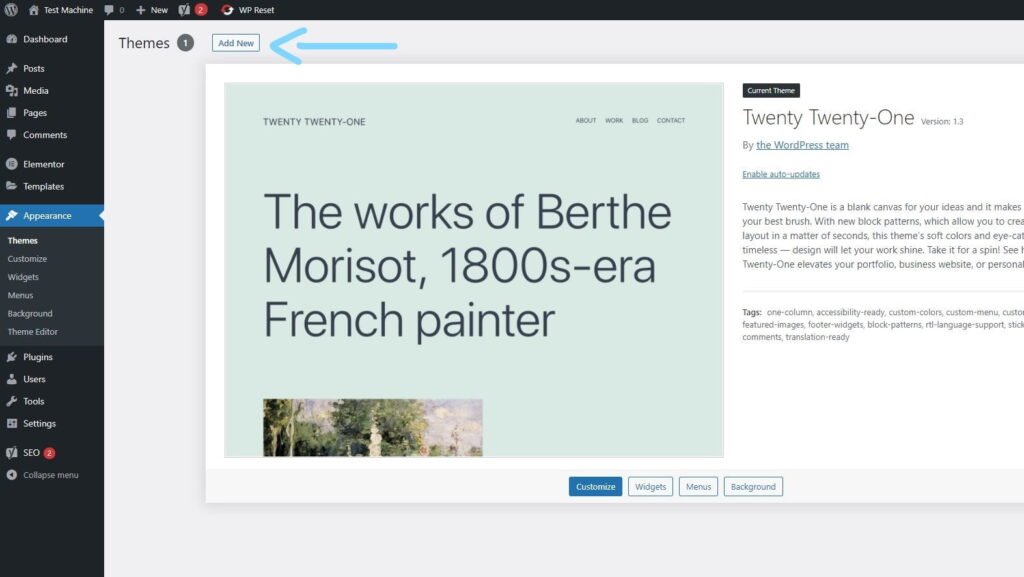
Step 3: Click the “Add New” button (this option is the same for both themes and plugins).
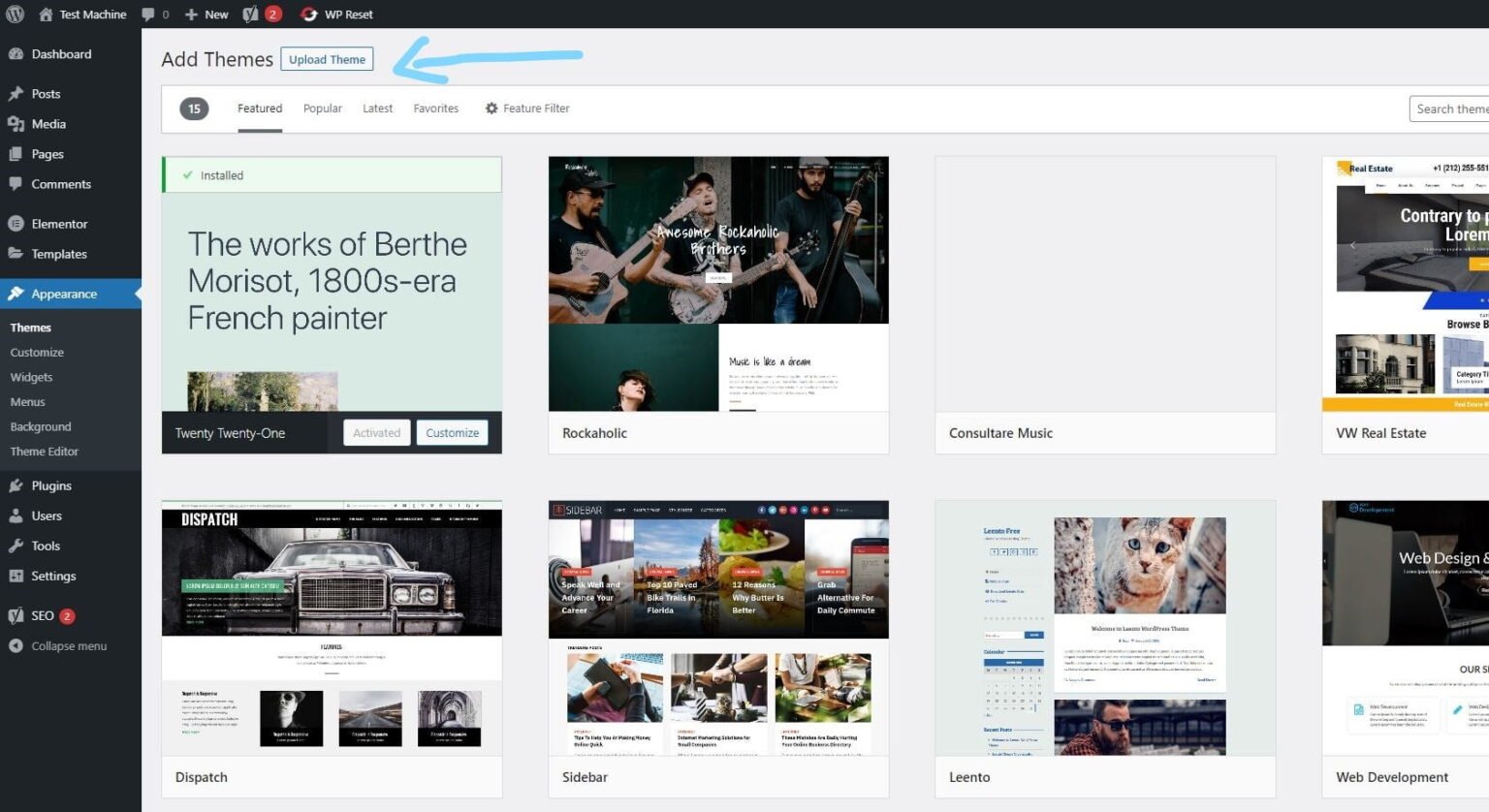
Step 4: Click “Upload Theme” if you’re installing a theme, or “Upload Plugin” if you’re in the plugins section.
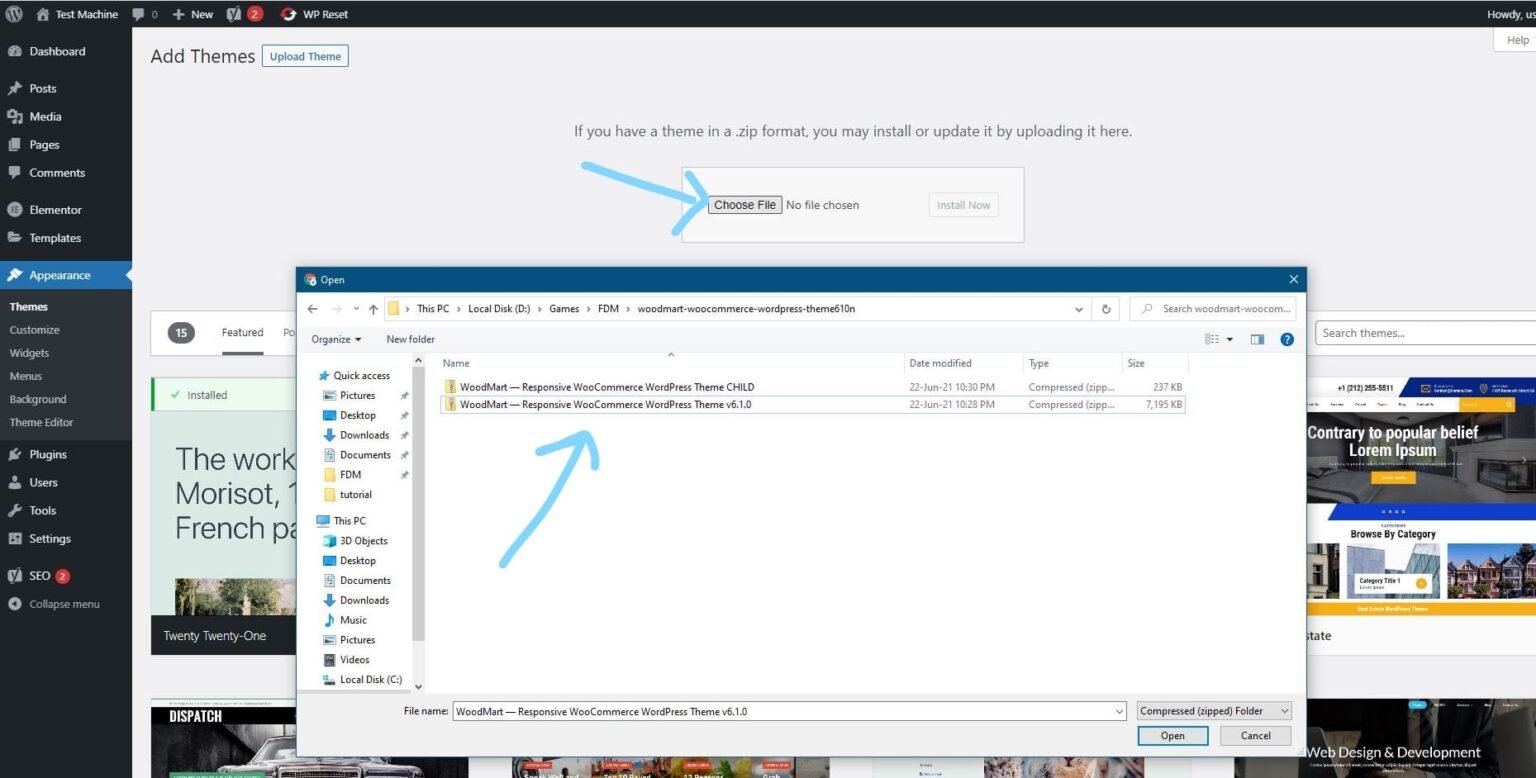
Step 5: Click “Choose File” and select the ZIP file of the theme or plugin you want to install.
Step 6: Click “Install Now.”
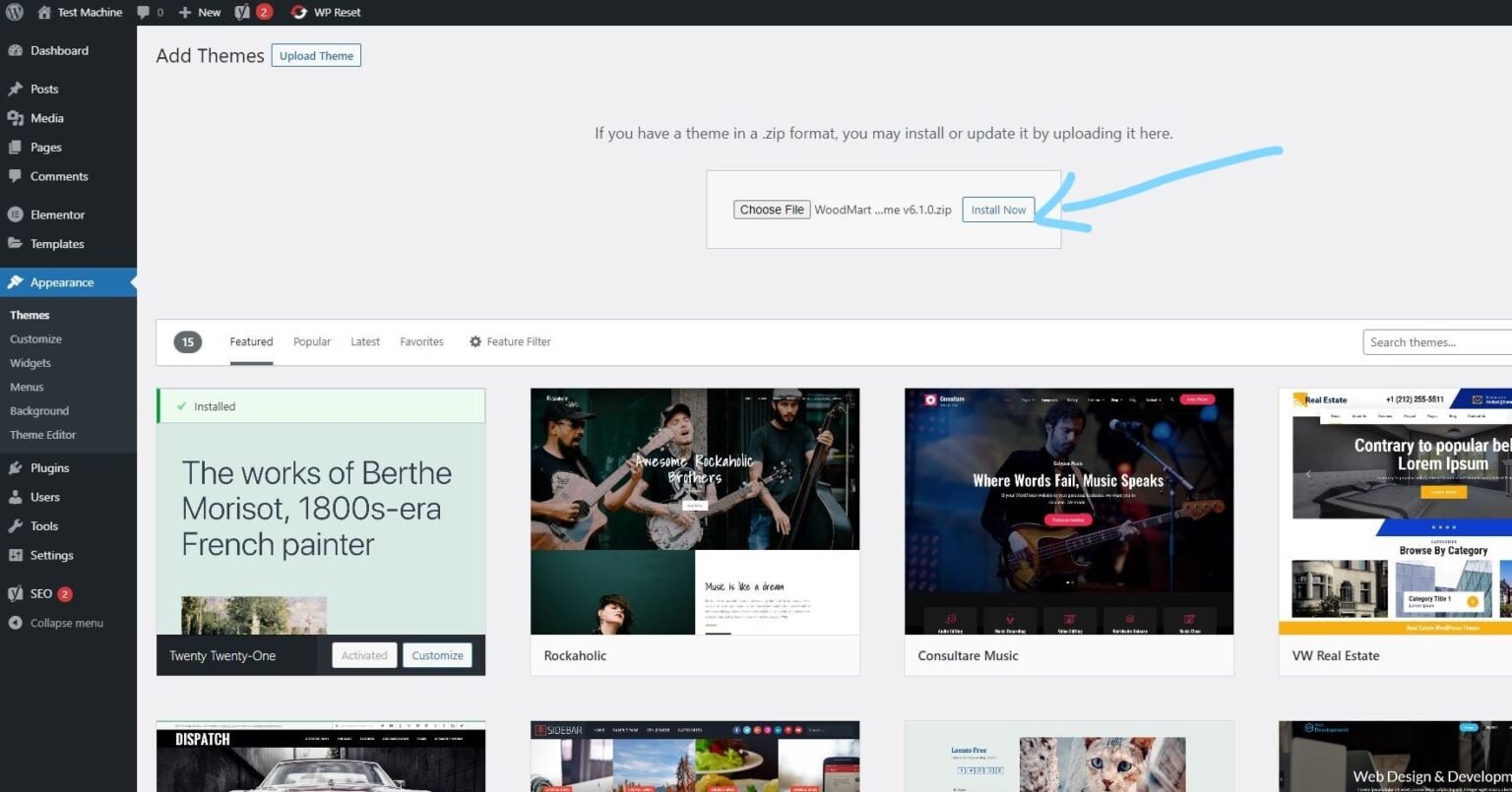
Step 7: The installation process will take a few seconds to complete.
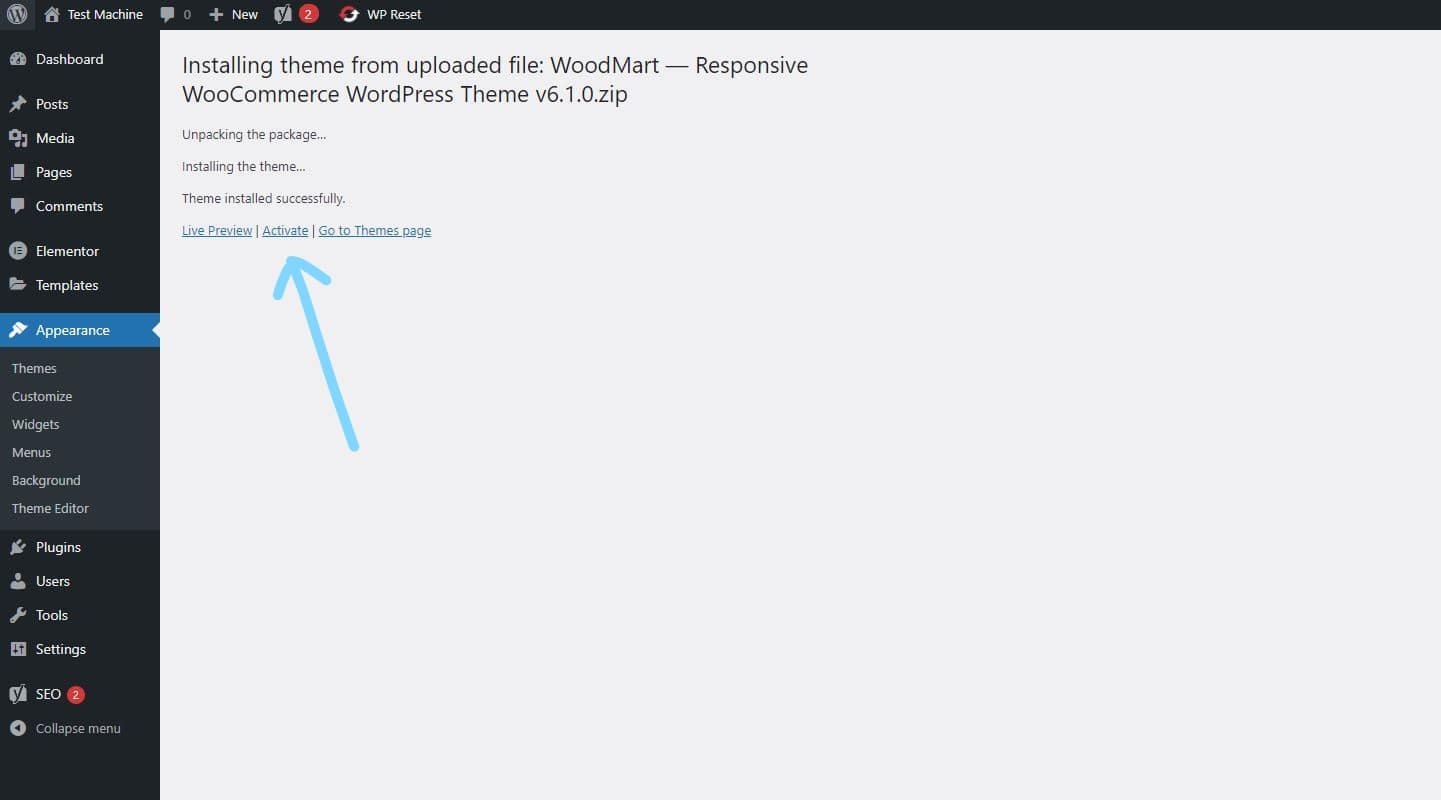
Step 8: Once the installation is complete, click “Activate” to manually activate your WordPress product.
How to Install Elementor Template Kits
Step 1: Download your template kit ZIP file. Do not unzip it.
Step 2: In WordPress, go to Settings → Permalinks and make sure Post Name is selected, then click Save.
Step 3: Navigate to Appearance → Themes → Add New and ensure Hello Elementor is installed and activated.
Step 4: If the theme prompts you to install the Elementor Page Builder plugin, click Install and then Activate.
Step 5: Go to Elementor → Settings, click the Features tab, and ensure the Flexbox Container shows a green icon. If not, set it to Active.
Step 6: Navigate to Plugins → Add New, search for Envato, and install and activate the Envato Elements – Photos & Elementor Templates plugin.
Note: If your kit requires Elementor Pro, make sure it is installed before continuing.
Step 7: Go to Elements → Installed Kits and click Upload Template Kit ZIP File. Your templates will now appear.
Step 8: Look for the orange banner at the top of the screen and click Install Requirements to load the necessary kit addons and settings.
That’s it! You’re now ready to start building your site.
-
Imported templates are stored in Elementor → Templates → Saved Templates and must be inserted into a new page in WordPress before customisation.
-
Imported blocks, tabs, or slides are also stored under Templates → Saved Templates and can be duplicated and customized directly.
-
Elementor Pro site parts are stored under Templates → Theme Builder and can be customized directly.
For detailed, step-by-step instructions with screenshots, copy and open the link below in a new tab.
How to Upload Install Elementor Template Kits from Themeforest to WordPress




Reviews
There are no reviews yet.