



Description
Anarkali v1.0.9 – Fashion Shop Ecommerce Elementor Theme
In the vibrant tapestry of online fashion retail, **Anarkali** unfolds as a theme infused with cultural richness and modern adaptability. It does not merely present products—it narrates style through a lens inspired by Indian aesthetics, blending tradition with contemporary flair in a way that feels both expressive and refined.
Crafted with a distinctive palette rooted in cultural vibrancy, Anarkali is ideally suited for showcasing ethnic attire, heritage collections, and globally inspired fashion pieces. Yet, it does not confine itself to tradition alone. The framework extends gracefully into modern fashion domains, accommodating everything from minimalist apparel lines to bold accessory collections.
One of its defining strengths lies in its unwavering compatibility. Continuously updated, the theme aligns seamlessly with the latest versions of WordPress and WooCommerce, ensuring stability and future readiness without interruption. It evolves quietly in the background, allowing store owners to focus on creativity rather than maintenance.
—
### **A Framework Designed for Fluid Creation**
At the core of Anarkali resides the **NineTheme Dynamic Framework**—a flexible engine that empowers users to shape their online stores with remarkable precision. From the intricacies of product pages to the nuances of checkout flows, every segment of the shopping journey can be adjusted, refined, and reimagined.
The process feels less like configuration and more like orchestration. With Elementor integration, building a store becomes an intuitive exercise—drag, place, refine, and watch the layout take form almost instantly. Even those with minimal technical exposure can craft visually compelling storefronts within minutes.
—
### **Customization Without Constraint**
Anarkali invites users to step beyond predefined boundaries. Its architecture allows intervention across virtually every layer of the website, enabling deep customization without sacrificing usability. Professional-grade coding underpins the system, yet it remains hidden beneath an accessible interface—offering power without complexity.
This flexibility translates into tangible efficiency. Features that might otherwise require additional plugins or custom development are readily available, reducing both time investment and technical overhead.
—
### **A Fusion of Tradition and Innovation**
The theme’s identity rests on a delicate balance—honoring cultural design elements while embracing modern eCommerce functionality. It creates an environment where heritage-inspired collections and contemporary fashion lines coexist seamlessly, each presented with equal elegance.
—
In essence, Anarkali is more than a fashion theme—it is a stylistic canvas. It empowers creators to build immersive, culturally enriched online stores that feel both distinctive and effortlessly functional, transforming the act of selling fashion into an experience of storytelling and design.
Updates & Support
Updates:
-
If you purchase a product individually, you will receive 10 downloads per product, along with one year of future updates. After one year, the digital product files will no longer be accessible. If you use all 10 downloads within the one-year period, simply contact us and we will increase your download limit.
Note: This download limit is in place to maintain server performance and prevent unnecessary load or spam.
- We regularly update our products as soon as new versions are released. Once we are notified of an update, we download it directly from the author and upload the latest version to our website. However, if you find that a product is not up to date, you can request an update through our contact us page.
Support:-
- If you have any questions or need assistance with installing or configuring any digital products purchased from our website, feel free to contact us.
- Please note that we are not the original developers of these products, so our technical support is limited. We do not modify product functionality or resolve issues related to developer-side bugs.
WHY SO AFFORDABLE?
- All WordPress items, including themes and plugins, are licensed under the General Public License (GPL). This license allows redistribution once the product has been legally purchased.
- Your purchase helps us maintain our platform and acquire new products from third-party theme and plugin developers. This community-driven funding model keeps our costs low, allowing us to pass significant savings on to you.
- Please note that our products do not include premium developer support, which is why we are able to offer discounts of up to 95% on popular commercial WordPress themes and plugins.
HOW TO INSTALL/UPDATE?
How to Install/Update WordPress Themes/Plugins manually?
Click to watch Video Tutorial
Step 1: Purchase the product and download the ZIP file.
Note: Some ZIP files may need to be extracted before uploading.
If you are updating an existing theme or plugin, install the latest version and WordPress will automatically replace the older one. All your existing settings and customisation will remain unchanged.
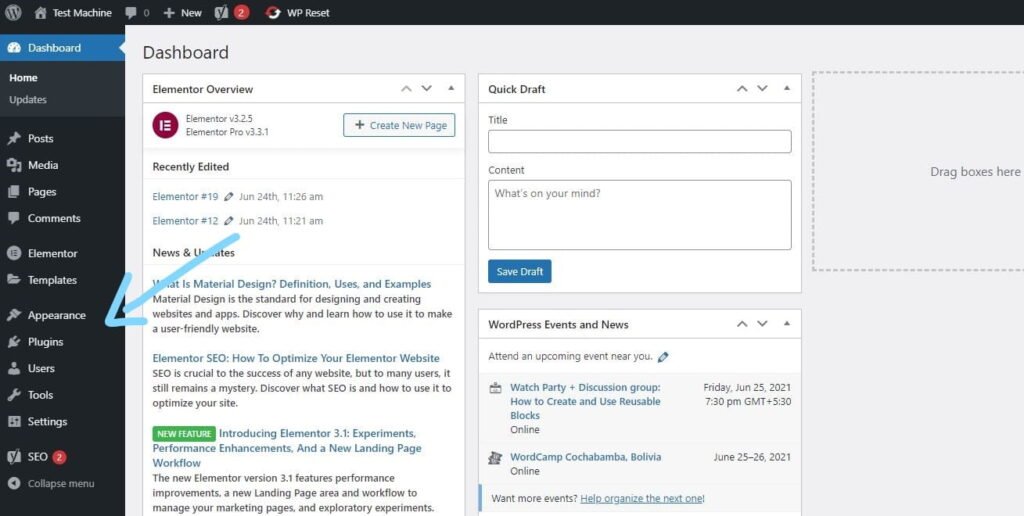
Step 2: From your WordPress dashboard, go to Appearance → Themes if you’re installing a theme, or navigate to Plugins if you’re installing a plugin.
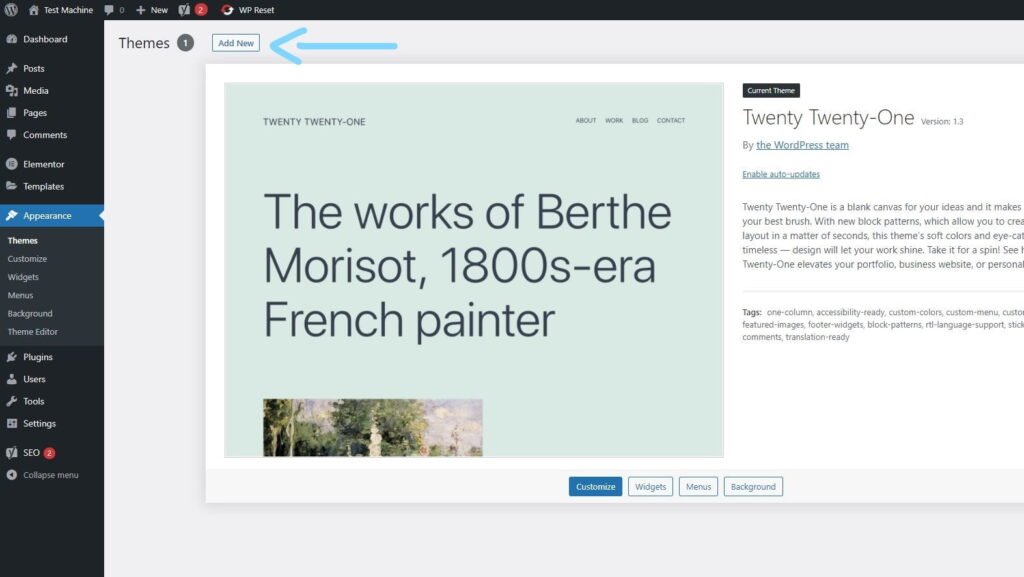
Step 3: Click the “Add New” button (this option is the same for both themes and plugins).
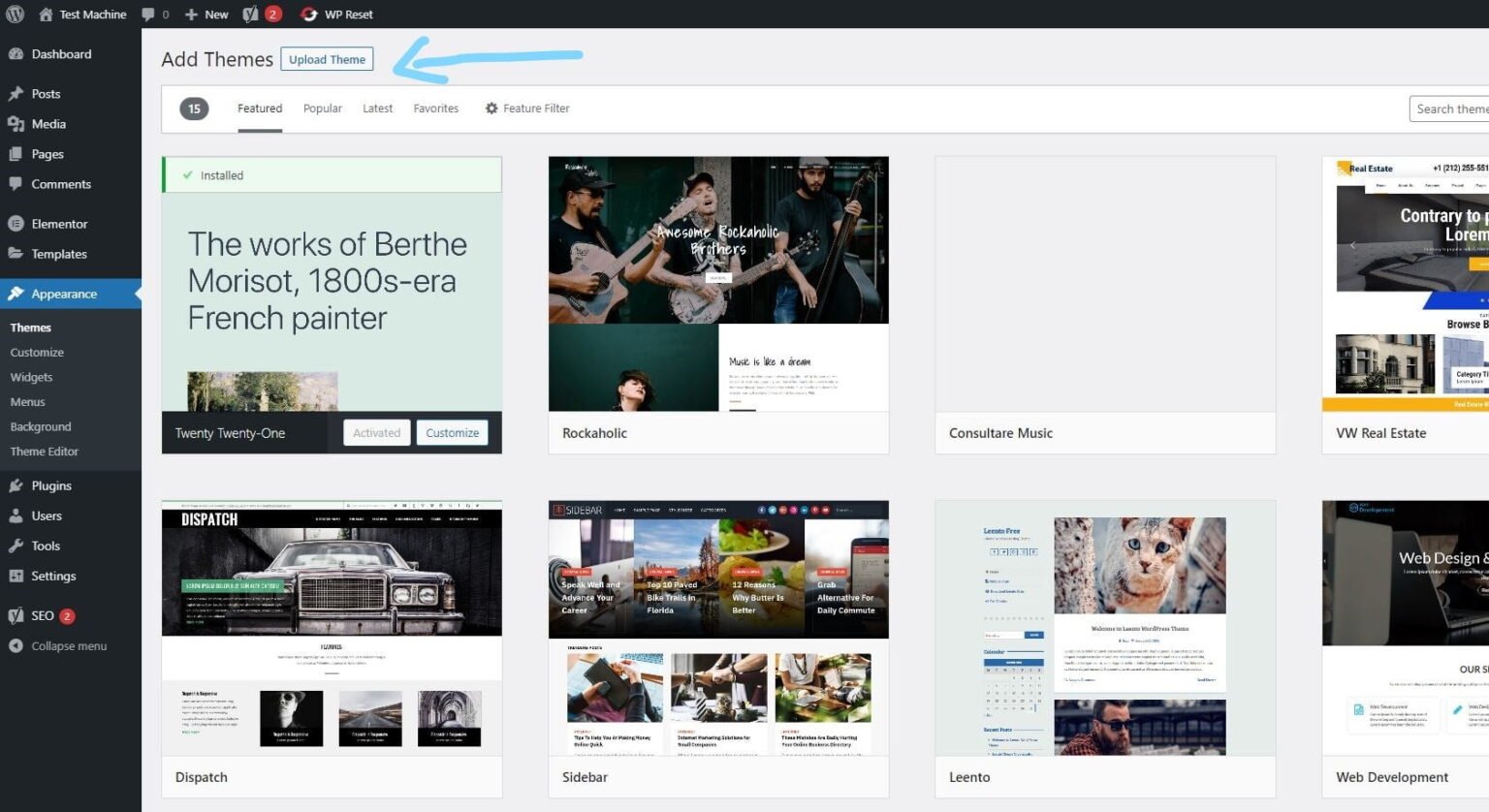
Step 4: Click “Upload Theme” if you’re installing a theme, or “Upload Plugin” if you’re in the plugins section.
Step 5: Click “Choose File” and select the ZIP file of the theme or plugin you want to install.
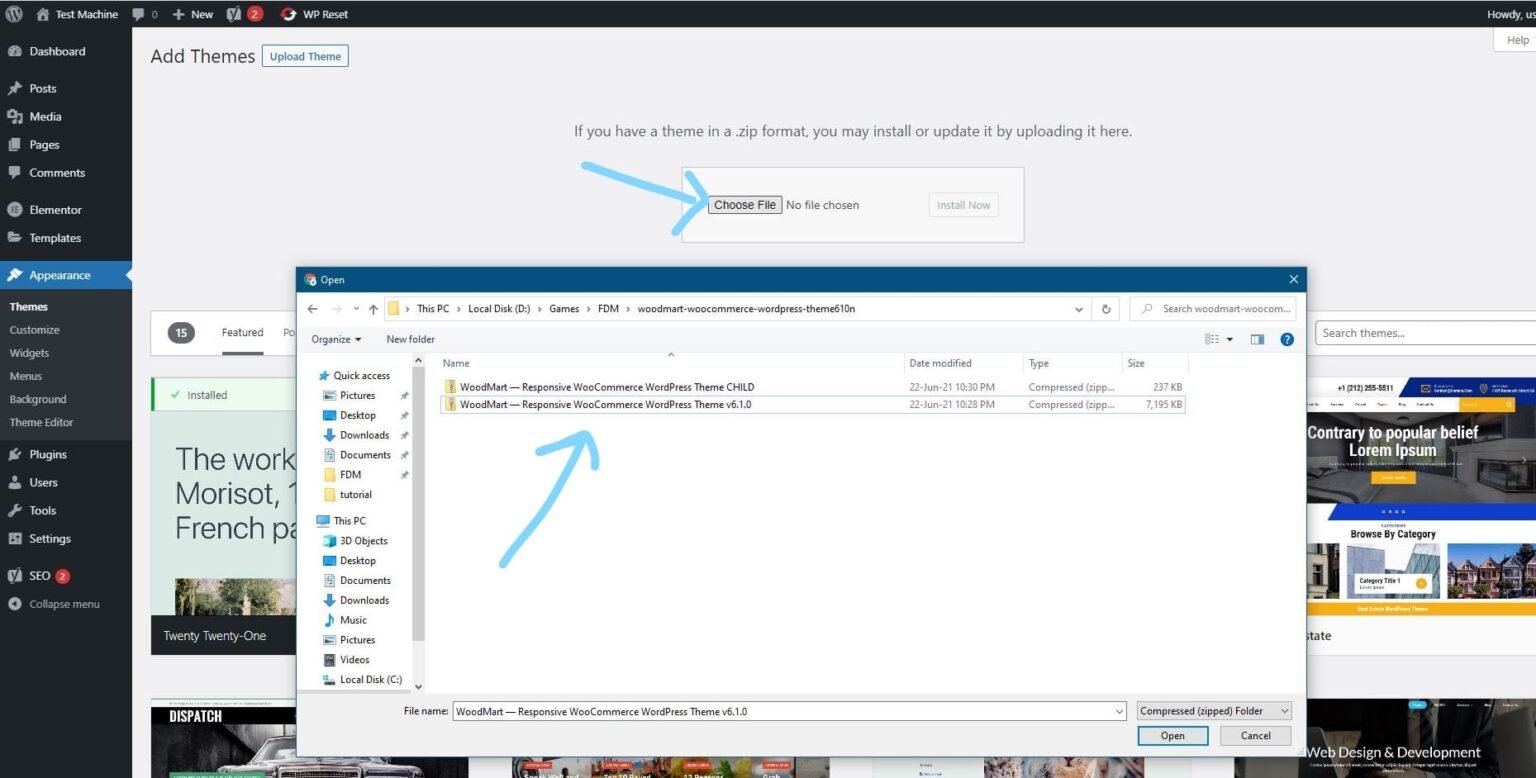
Step 6: Click “Install Now.”
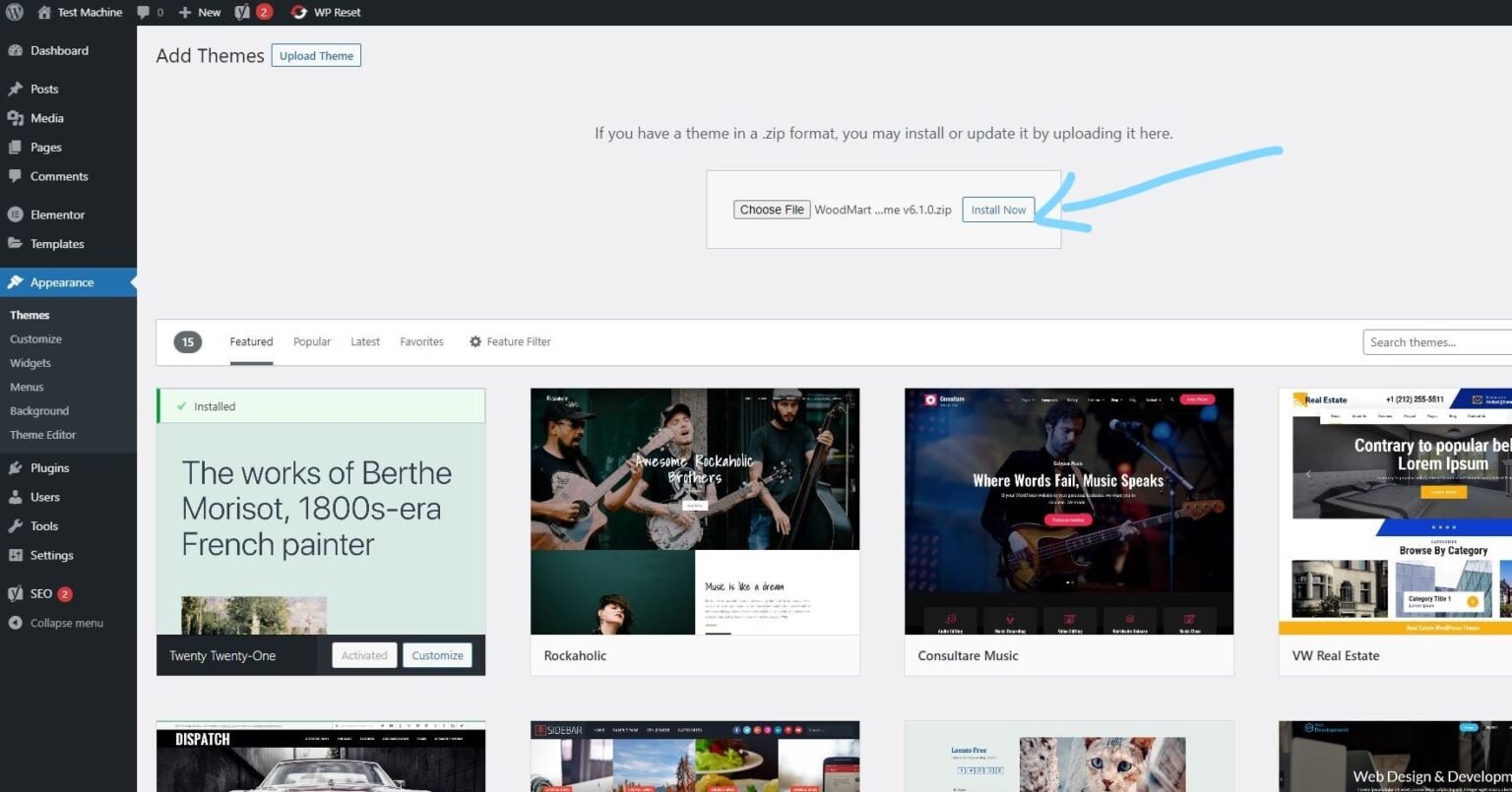
Step 7: The installation process will take a few seconds to complete.
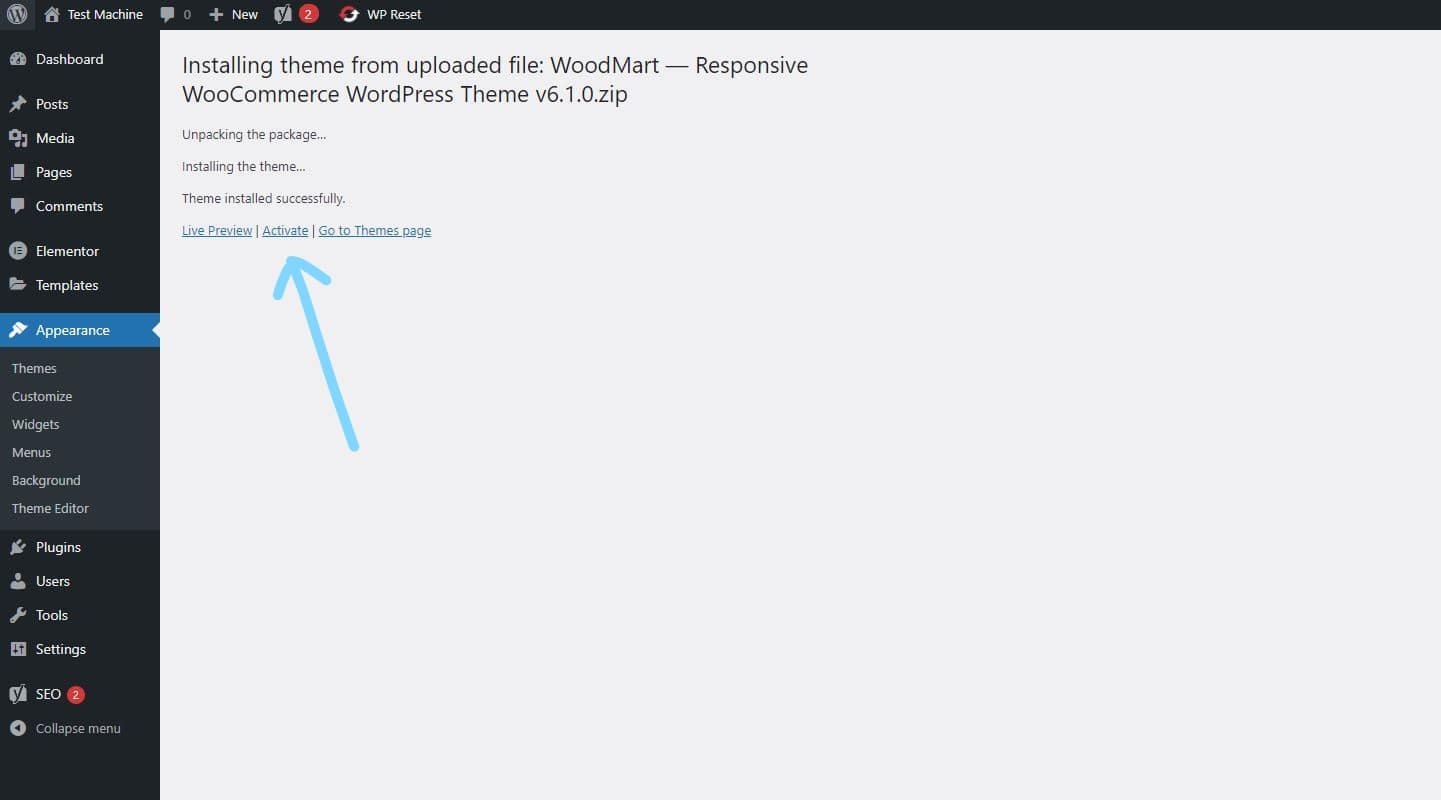
Step 8: Once the installation is complete, click “Activate” to manually activate your WordPress product.
How to Install Elementor Template Kits
Step 1: Download your template kit ZIP file. Do not unzip it.
Step 2: In WordPress, go to Settings → Permalinks and make sure Post Name is selected, then click Save.
Step 3: Navigate to Appearance → Themes → Add New and ensure Hello Elementor is installed and activated.
Step 4: If the theme prompts you to install the Elementor Page Builder plugin, click Install and then Activate.
Step 5: Go to Elementor → Settings, click the Features tab, and ensure the Flexbox Container shows a green icon. If not, set it to Active.
Step 6: Navigate to Plugins → Add New, search for Envato, and install and activate the Envato Elements – Photos & Elementor Templates plugin.
Note: If your kit requires Elementor Pro, make sure it is installed before continuing.
Step 7: Go to Elements → Installed Kits and click Upload Template Kit ZIP File. Your templates will now appear.
Step 8: Look for the orange banner at the top of the screen and click Install Requirements to load the necessary kit addons and settings.
That’s it! You’re now ready to start building your site.
-
Imported templates are stored in Elementor → Templates → Saved Templates and must be inserted into a new page in WordPress before customisation.
-
Imported blocks, tabs, or slides are also stored under Templates → Saved Templates and can be duplicated and customized directly.
-
Elementor Pro site parts are stored under Templates → Theme Builder and can be customized directly.
For detailed, step-by-step instructions with screenshots, copy and open the link below in a new tab.
How to Upload Install Elementor Template Kits from Themeforest to WordPress




Reviews
There are no reviews yet.