


Description
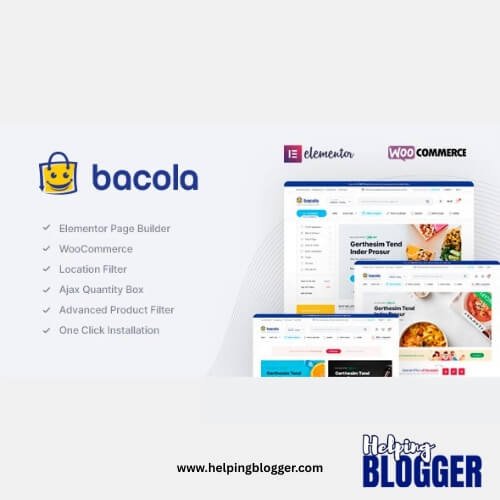
Bacola v1.5.5 – Grocery Store and Food eCommerce Theme
In the bustling digital marketplace where convenience reigns supreme, **Bacola** emerges as a purpose-built WordPress theme—carefully tailored for grocery stores, organic markets, and food-centric eCommerce ventures. It does not merely assist in building a website; it accelerates the entire process, transforming concept into a fully operational storefront with striking efficiency.
Bacola is crafted with a singular vision: to simplify the creation of online food businesses without diluting functionality. Whether one is launching a neighborhood grocery shop, an organic produce boutique, or a full-scale online supermarket, the theme adapts with seamless fluidity. Its architecture supports a wide array of business models—ranging from single-vendor stores to expansive multi-vendor marketplaces, where multiple sellers coexist within a unified digital space.
What makes Bacola particularly inviting is its accessibility. Even those with minimal technical exposure can navigate its ecosystem with ease. The integration of Elementor and WooCommerce acts as a guiding framework, enabling users to assemble layouts, manage products, and configure transactions without wrestling with complexity. It feels less like coding and more like arranging elements on a canvas.
The theme’s design language reflects its purpose—clean, vibrant, and structured to highlight products effectively. Categories such as fresh vegetables, packaged goods, or specialty items can be showcased with clarity, encouraging intuitive browsing and effortless purchasing. For businesses venturing into delivery services or food distribution, Bacola provides the necessary scaffolding to support logistics and customer interaction.
Speed of deployment is another notable advantage. What might traditionally take days—or even weeks—can be accomplished within hours. Pre-built components, thoughtfully arranged, allow users to assemble a functional store rapidly, without sacrificing quality or visual appeal.
—
In essence, Bacola is more than a theme—it is a streamlined gateway into the world of online grocery commerce. It blends simplicity with capability, offering entrepreneurs a practical yet refined solution to establish a digital presence that feels both professional and inviting.,
Bacola Theme Features
Elementor Page Builder
WooCommerce ready
Dokan (Multi-Vendor Plugin) is ready
WC Marketplace (Multi-Vendor Plugin) is ready
Compatible with RTL(Right to Left Arabic)
Location Filter ready
Quantity Field for Product Box ready
Load More Pagination Ajax ready
Infinite Scroll Pagination Ajax is ready
Quick View ready
Ajax Product Search ready
Wishlist ready
Product Image Zoom ready
Product Video (Youtube and Vimeo) ready
Product Mobile Filters ready
Product Category Filters ready
Product Status (Stock/On Sale) ready
Product Filter by Color
Product Filter by Brand
Order Tracking ready
GDPR ready
Popup Newsletter ready
Video Tutorials ready
WOOCS Multi-Currency ready
WPML(Multilanguage) supported
Polylang(Multilanguage) supported
Loco Translate supported
Contact Form 7
Metabox supported
Total Cache Config file for quick theme cache and speed options
Google Web Fonts
Blog ready
.POT for all languages – Multilanguage
7/24 fast support
One-click demo data installer and XML
One-click theme update
Parallax background image and video support
Updates & Support
Updates:
-
If you purchase a product individually, you will receive 10 downloads per product, along with one year of future updates. After one year, the digital product files will no longer be accessible. If you use all 10 downloads within the one-year period, simply contact us and we will increase your download limit.
Note: This download limit is in place to maintain server performance and prevent unnecessary load or spam.
- We regularly update our products as soon as new versions are released. Once we are notified of an update, we download it directly from the author and upload the latest version to our website. However, if you find that a product is not up to date, you can request an update through our contact us page.
Support:-
- If you have any questions or need assistance with installing or configuring any digital products purchased from our website, feel free to contact us.
- Please note that we are not the original developers of these products, so our technical support is limited. We do not modify product functionality or resolve issues related to developer-side bugs.
WHY SO AFFORDABLE?
- All WordPress items, including themes and plugins, are licensed under the General Public License (GPL). This license allows redistribution once the product has been legally purchased.
- Your purchase helps us maintain our platform and acquire new products from third-party theme and plugin developers. This community-driven funding model keeps our costs low, allowing us to pass significant savings on to you.
- Please note that our products do not include premium developer support, which is why we are able to offer discounts of up to 95% on popular commercial WordPress themes and plugins.
HOW TO INSTALL/UPDATE?
How to Install/Update WordPress Themes/Plugins manually?
Click to watch Video Tutorial
Step 1: Purchase the product and download the ZIP file.
Note: Some ZIP files may need to be extracted before uploading.
If you are updating an existing theme or plugin, install the latest version and WordPress will automatically replace the older one. All your existing settings and customisation will remain unchanged.
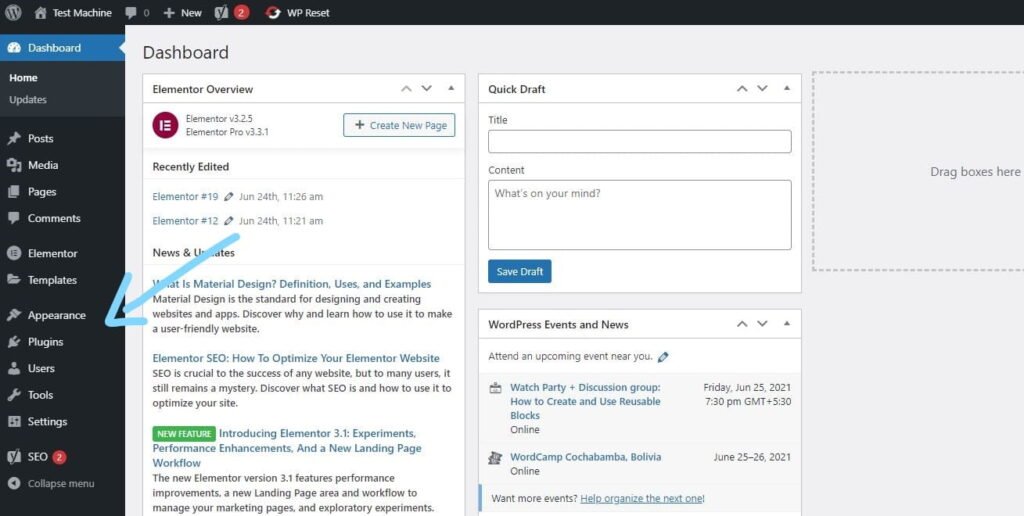
Step 2: From your WordPress dashboard, go to Appearance → Themes if you’re installing a theme, or navigate to Plugins if you’re installing a plugin.
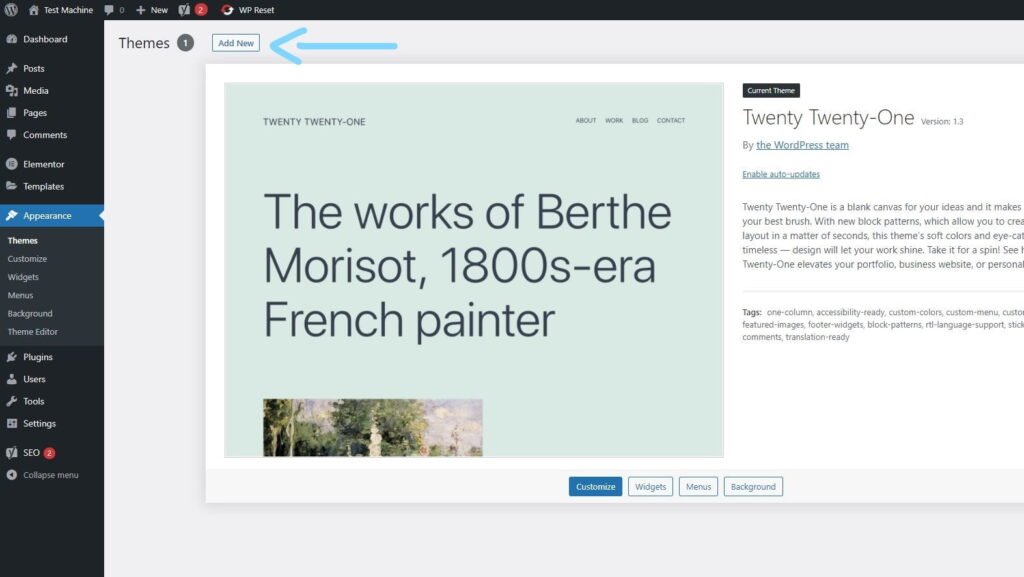
Step 3: Click the “Add New” button (this option is the same for both themes and plugins).
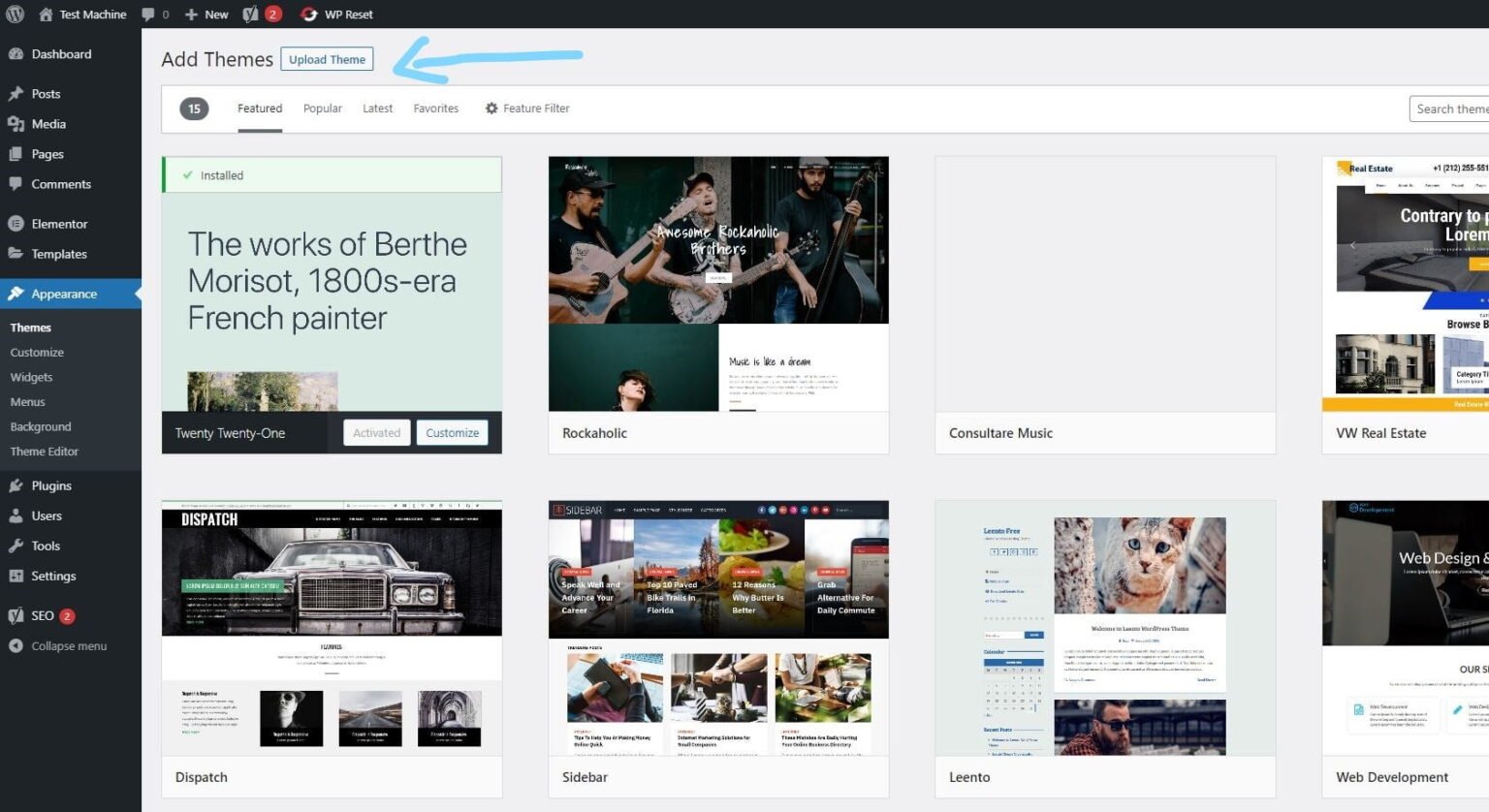
Step 4: Click “Upload Theme” if you’re installing a theme, or “Upload Plugin” if you’re in the plugins section.
Step 5: Click “Choose File” and select the ZIP file of the theme or plugin you want to install.
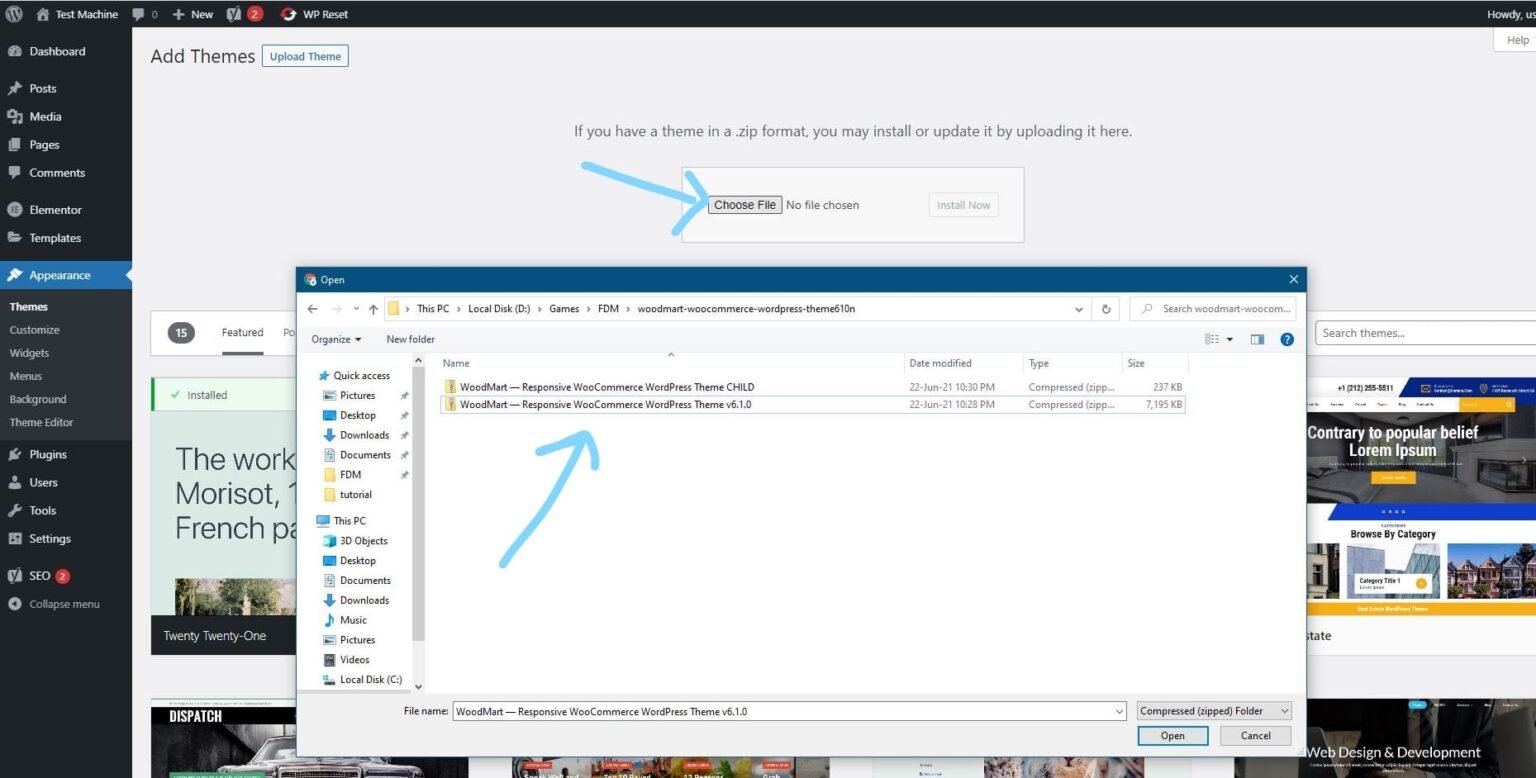
Step 6: Click “Install Now.”
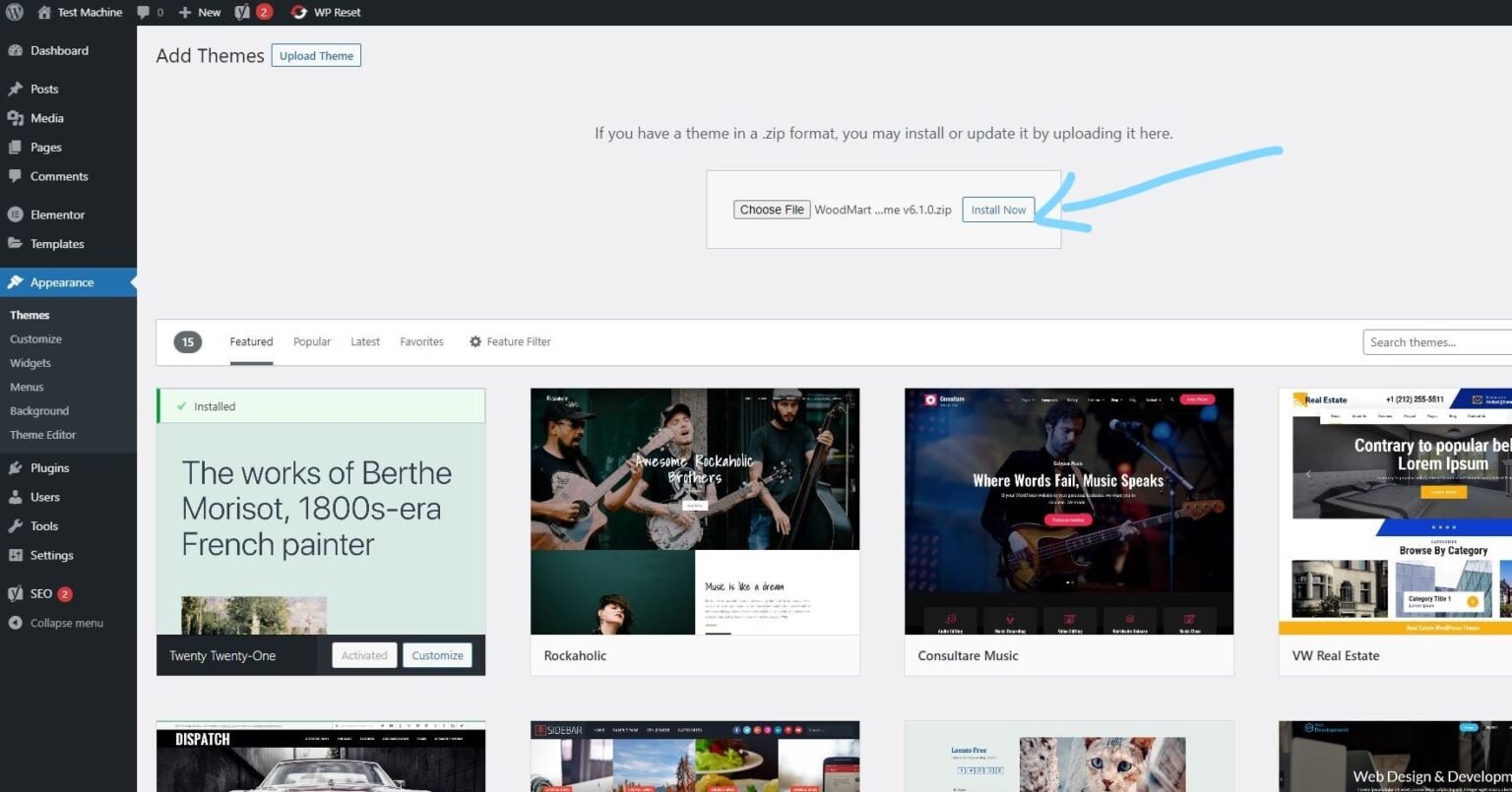
Step 7: The installation process will take a few seconds to complete.
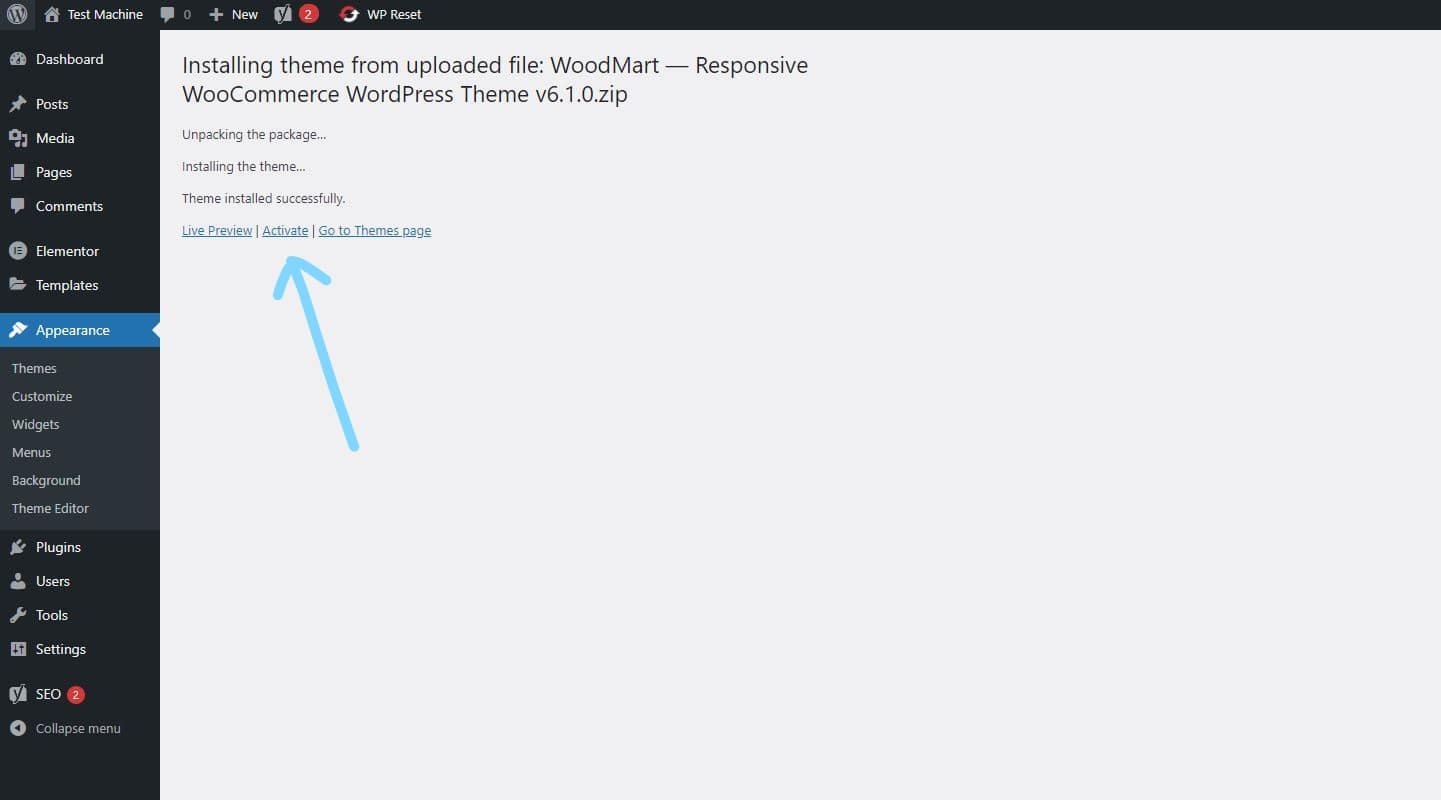
Step 8: Once the installation is complete, click “Activate” to manually activate your WordPress product.
How to Install Elementor Template Kits
Step 1: Download your template kit ZIP file. Do not unzip it.
Step 2: In WordPress, go to Settings → Permalinks and make sure Post Name is selected, then click Save.
Step 3: Navigate to Appearance → Themes → Add New and ensure Hello Elementor is installed and activated.
Step 4: If the theme prompts you to install the Elementor Page Builder plugin, click Install and then Activate.
Step 5: Go to Elementor → Settings, click the Features tab, and ensure the Flexbox Container shows a green icon. If not, set it to Active.
Step 6: Navigate to Plugins → Add New, search for Envato, and install and activate the Envato Elements – Photos & Elementor Templates plugin.
Note: If your kit requires Elementor Pro, make sure it is installed before continuing.
Step 7: Go to Elements → Installed Kits and click Upload Template Kit ZIP File. Your templates will now appear.
Step 8: Look for the orange banner at the top of the screen and click Install Requirements to load the necessary kit addons and settings.
That’s it! You’re now ready to start building your site.
-
Imported templates are stored in Elementor → Templates → Saved Templates and must be inserted into a new page in WordPress before customisation.
-
Imported blocks, tabs, or slides are also stored under Templates → Saved Templates and can be duplicated and customized directly.
-
Elementor Pro site parts are stored under Templates → Theme Builder and can be customized directly.
For detailed, step-by-step instructions with screenshots, copy and open the link below in a new tab.
How to Upload Install Elementor Template Kits from Themeforest to WordPress




Reviews
There are no reviews yet.