



Description
Newspaper – News & WooCommerce WordPress Theme
Newspaper is a powerful WordPress theme that makes writing and publishing articles and blog posts easy. We provide reliable support and helpful guidance to ensure a smooth experience.
Create a powerful news website using our best-selling Newspaper template. Perfect for blogs, news sites, magazines, and review platforms, it supports YouTube videos and is fully AMP-ready, mobile-friendly, and GDPR-compliant. Fast, lightweight, and easy to use, it’s ideal for cryptocurrency, fashion, food, lifestyle, travel, luxury, viral, minimalist, and modern web projects.
Seamlessly integrated with Instagram, bbPress Forum, BuddyPress, and WooCommerce, Newspaper is built using clean, SEO-friendly practices. It also supports responsive Google Ads and AdSense to help you maximize revenue.
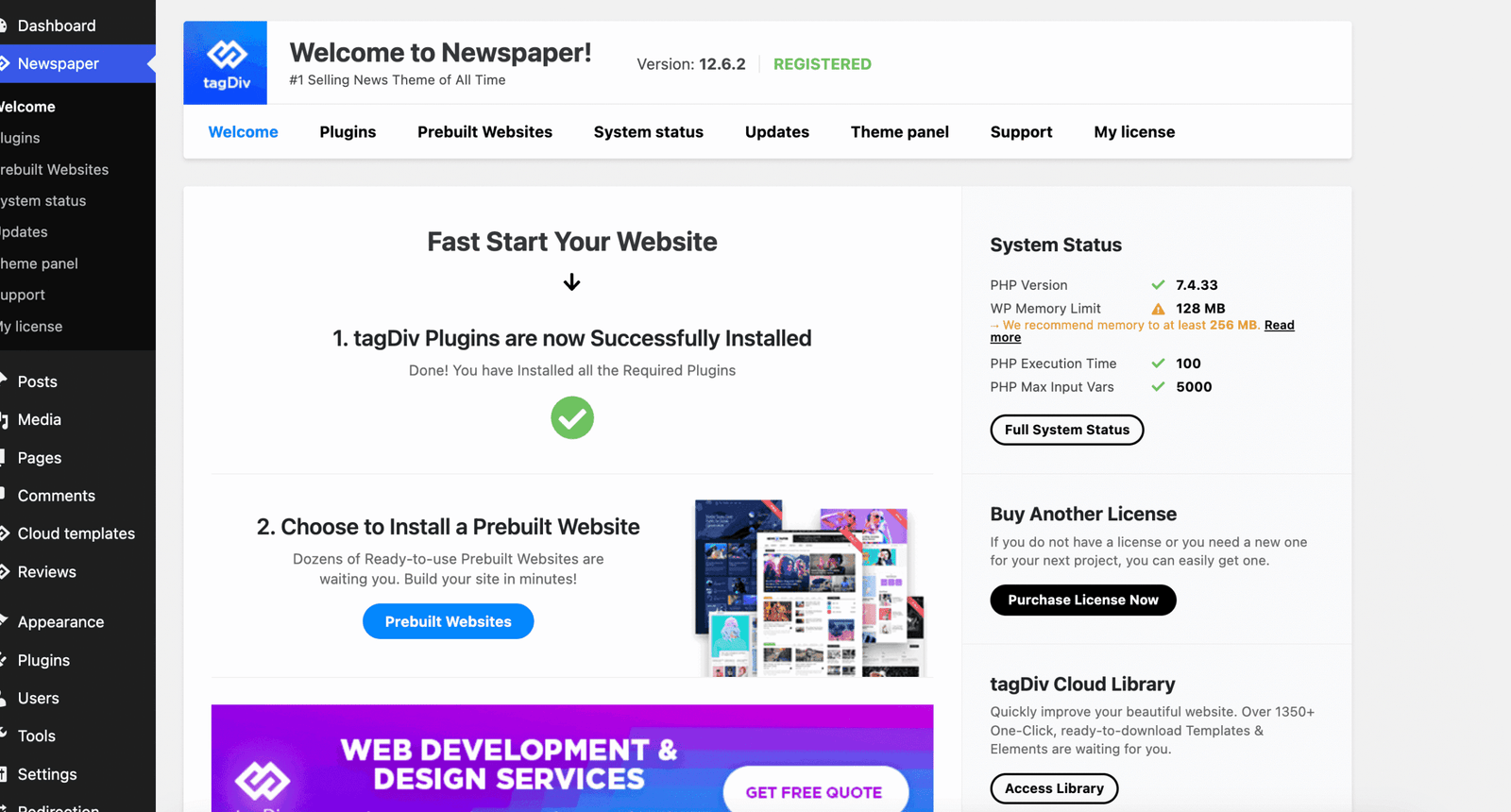
Newspaper Theme – News & WooCommerce WordPress Theme features
Newspaper is a flexible WordPress theme built for effortless article and blog creation, supported by great service and a friendly support team.
The Newspaper template is ideal for news websites, online newspapers, magazines, publishing platforms, and review sites. It supports YouTube videos and includes a built-in rating system. The theme is integrated with bbPress Forum, BuddyPress, and WooCommerce, follows clean SEO best practices, and delivers fast, simple, and user-friendly performance. Additionally, Newspaper supports responsive Google Ads and Google AdSense for effective monetization.
Video powered websites
Create an outstanding user experience with the Newspaper Theme. Showcase your video content using an engaging modal video popup with ad support. To help you share important news faster, the theme allows your audience to watch vlogs or article videos instantly by clicking on the featured video thumbnail.
Videos play seamlessly right on the page, allowing you to experiment and get creative with your content.
Time highlights on videos
Newspaper displays video duration times for videos from YouTube, Dailymotion, Vimeo, and self-hosted sources. Impress your audience with eye-catching content and keep them engaged on your site—it’s that easy.
Floating Videos on articles
Give your videos the attention they deserve and keep visitors watching as they scroll through your articles. With the new Sticky Video Player, videos remain visible and continue playing while users move down the page. Discover this powerful feature to boost time-on-page and engagement metrics, and be more creative and productive with the Newspaper Theme.
The new definition of flexibility
Yes! Newspaper Theme Flex Blocks are now more versatile than ever, and we’re excited to introduce this more powerful version. With newly added advanced filters, you can create professional-looking designs using fewer components across your articles and pages.
For the first time, you can inspire your visitors by showcasing category content directly within a single post in a meaningful way. Filter posts using powerful options such as Most Commented, Last Updated, Popular (last seven days), Highest Rated, and more. Effortlessly combine your content to captivate your audience—it’s simple, versatile, and built just the way you asked.
Happy blogging!
Automatic updates ON
Updating the Newspaper Theme has never been easier. Starting with version 10.4, you can install the latest release with a single click directly from the Theme Panel. The system automatically downloads the update from tagDiv servers and updates both the theme files and native plugins—so you can stay focused on creating amazing content.
The Newspaper theme also automatically creates a backup of your Theme Panel settings each time you click the Save button, allowing you to safely upgrade or downgrade your WordPress theme at any time.
WordPress 5+ ready!
WordPress 5.4 has just been released. As the first major update of the year bringing significant improvements, we closely followed its development and made all the necessary adjustments to ensure full compatibility.
You can now update your CMS with confidence—Newspaper Theme version 10.4 is fully compatible with WordPress 5.4 and runs smoothly. Take it for a spin!
Updates & Support
Updates:
-
If you purchase a product individually, you will receive 10 downloads per product, along with one year of future updates. After one year, the digital product files will no longer be accessible. If you use all 10 downloads within the one-year period, simply contact us and we will increase your download limit.
Note: This download limit is in place to maintain server performance and prevent unnecessary load or spam.
- We regularly update our products as soon as new versions are released. Once we are notified of an update, we download it directly from the author and upload the latest version to our website. However, if you find that a product is not up to date, you can request an update through our contact us page.
Support:-
- If you have any questions or need assistance with installing or configuring any digital products purchased from our website, feel free to contact us.
- Please note that we are not the original developers of these products, so our technical support is limited. We do not modify product functionality or resolve issues related to developer-side bugs.
WHY SO AFFORDABLE?
- All WordPress items, including themes and plugins, are licensed under the General Public License (GPL). This license allows redistribution once the product has been legally purchased.
- Your purchase helps us maintain our platform and acquire new products from third-party theme and plugin developers. This community-driven funding model keeps our costs low, allowing us to pass significant savings on to you.
- Please note that our products do not include premium developer support, which is why we are able to offer discounts of up to 95% on popular commercial WordPress themes and plugins.
HOW TO INSTALL/UPDATE?
How to Install/Update WordPress Themes/Plugins manually?
Click to watch Video Tutorial
Step 1: Purchase the product and download the ZIP file.
Note: Some ZIP files may need to be extracted before uploading.
If you are updating an existing theme or plugin, install the latest version and WordPress will automatically replace the older one. All your existing settings and customisation will remain unchanged.
Step 2: From your WordPress dashboard, go to Appearance → Themes if you’re installing a theme, or navigate to Plugins if you’re installing a plugin.
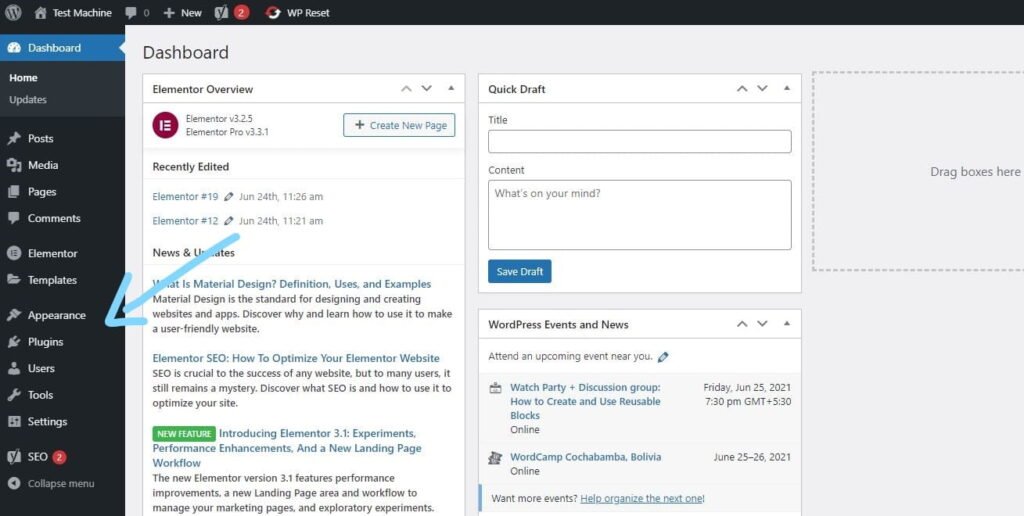
Step 3: Click the “Add New” button (this option is the same for both themes and plugins).
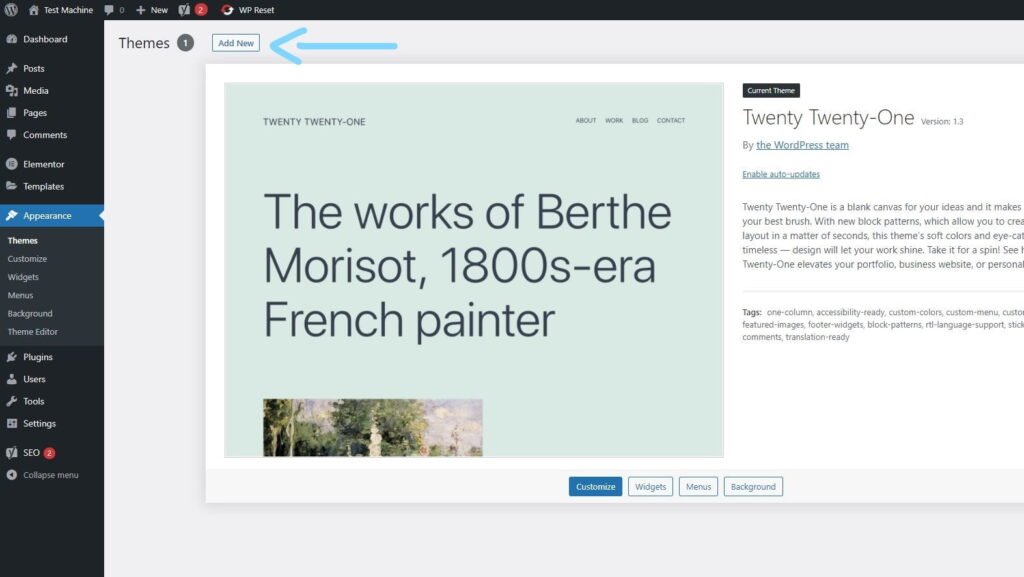
Step 4: Click “Upload Theme” if you’re installing a theme, or “Upload Plugin” if you’re in the plugins section.
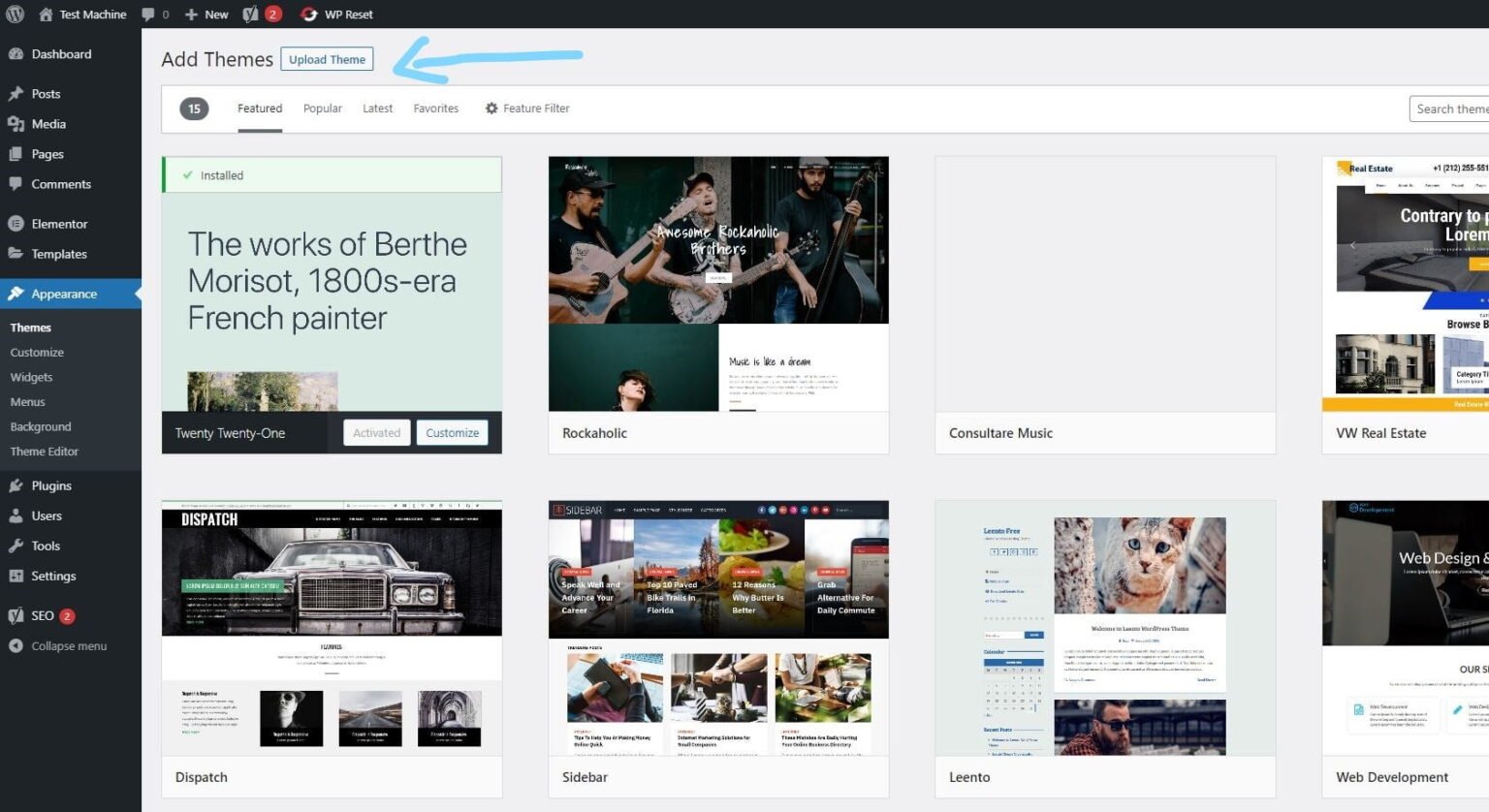
Step 5: Click “Choose File” and select the ZIP file of the theme or plugin you want to install.
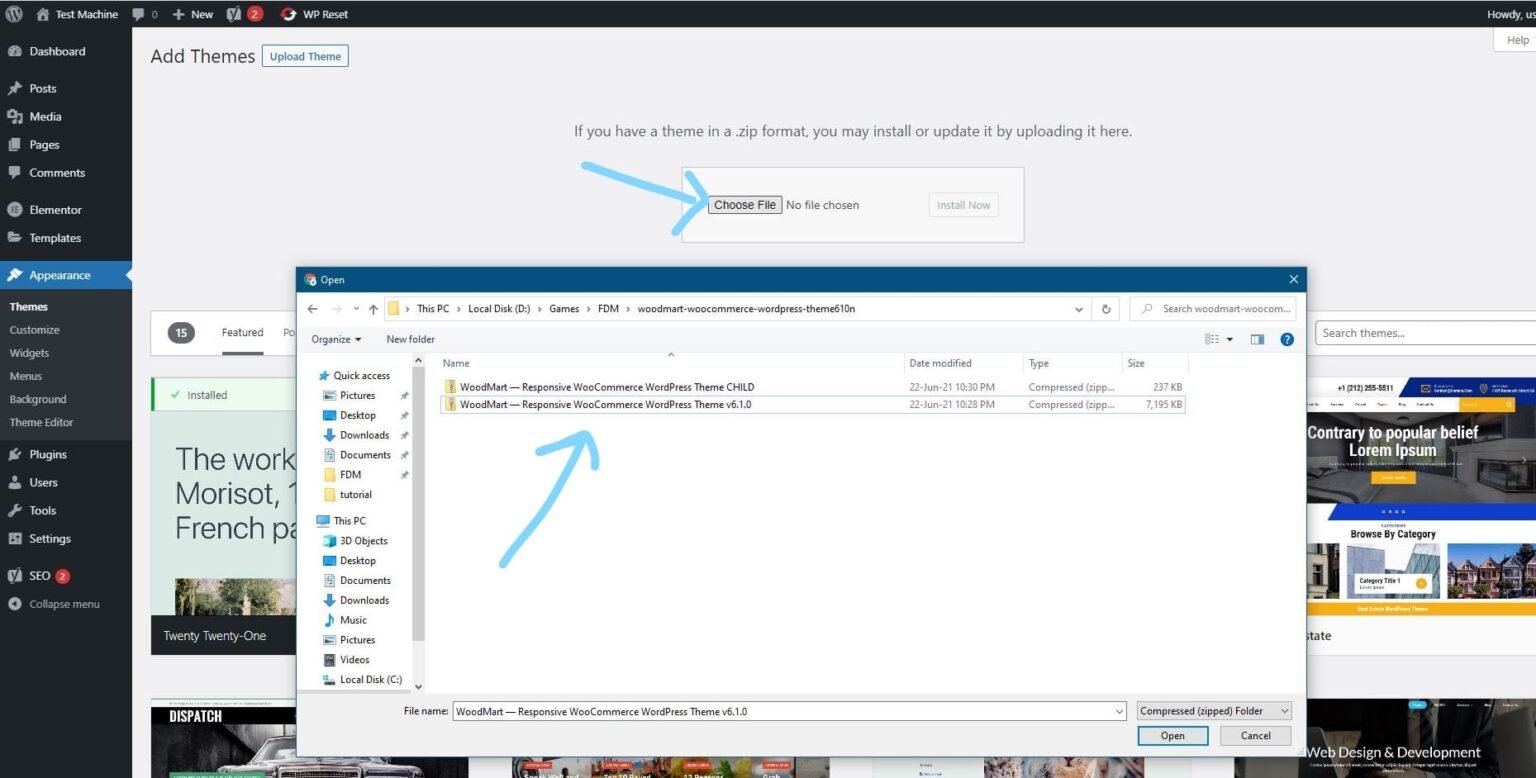
Step 6: Click “Install Now.”
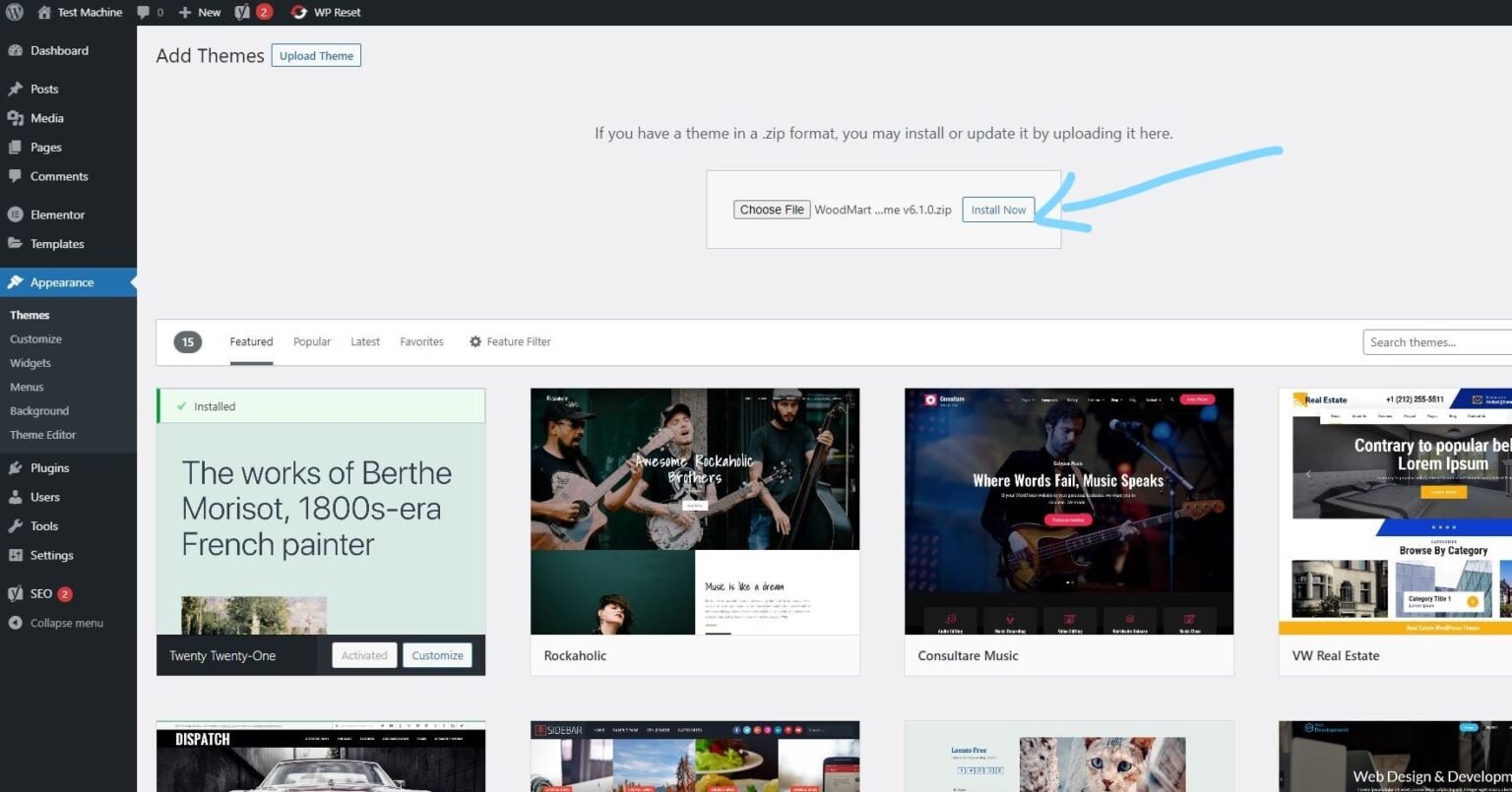
Step 7: The installation process will take a few seconds to complete.
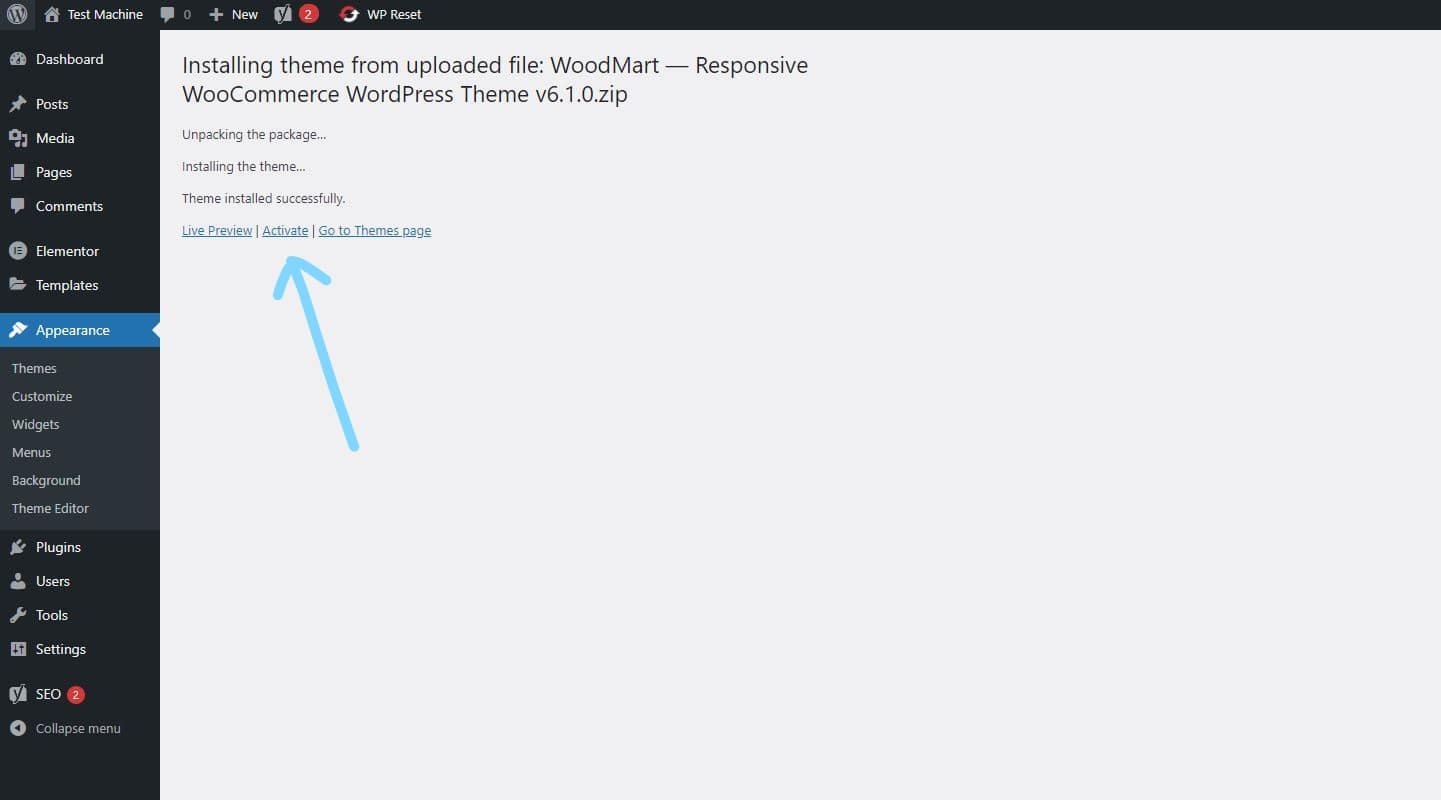
Step 8: Once the installation is complete, click “Activate” to manually activate your WordPress product.
How to Install Elementor Template Kits
Step 1: Download your template kit ZIP file. Do not unzip it.
Step 2: In WordPress, go to Settings → Permalinks and make sure Post Name is selected, then click Save.
Step 3: Navigate to Appearance → Themes → Add New and ensure Hello Elementor is installed and activated.
Step 4: If the theme prompts you to install the Elementor Page Builder plugin, click Install and then Activate.
Step 5: Go to Elementor → Settings, click the Features tab, and ensure the Flexbox Container shows a green icon. If not, set it to Active.
Step 6: Navigate to Plugins → Add New, search for Envato, and install and activate the Envato Elements – Photos & Elementor Templates plugin.
Note: If your kit requires Elementor Pro, make sure it is installed before continuing.
Step 7: Go to Elements → Installed Kits and click Upload Template Kit ZIP File. Your templates will now appear.
Step 8: Look for the orange banner at the top of the screen and click Install Requirements to load the necessary kit addons and settings.
That’s it! You’re now ready to start building your site.
-
Imported templates are stored in Elementor → Templates → Saved Templates and must be inserted into a new page in WordPress before customisation.
-
Imported blocks, tabs, or slides are also stored under Templates → Saved Templates and can be duplicated and customized directly.
-
Elementor Pro site parts are stored under Templates → Theme Builder and can be customized directly.
For detailed, step-by-step instructions with screenshots, copy and open the link below in a new tab.
How to Upload Install Elementor Template Kits from Themeforest to WordPress




Reviews
There are no reviews yet.