



Description
Studiopress – All Studiopress Themes with Framework Bundle
For those navigating the intricate corridors of WordPress design, this comprehensive **StudioPress Themes Bundle** unfolds as a treasure trove—an expansive collection that unifies craftsmanship, stability, and architectural elegance under one cohesive umbrella. At its nucleus lies the renowned **StudioPress Genesis Framework**, a robust skeletal system that lends both strength and sophistication to every theme it supports.
This bundle is not merely a compilation—it is an ecosystem. Each theme, meticulously engineered, inherits the Genesis Framework’s hallmark traits: clean code, fortified security, and an SEO-conscious backbone. The result is a suite of designs that feel both enduring and adaptable, like well-tailored garments that never lose their fit.
Accompanying the framework is **StudioPress Page Builder Pro**, a dynamic instrument that transforms layout creation into an intuitive, almost tactile experience. Alongside it, **StudioPress Academy Pro** offers a refined solution for educational platforms, signaling the bundle’s versatility across niches.
—
### **An Expansive Gallery of StudioPress Themes**
Within this collection resides an impressive array of themes, each curated to serve distinct creative and commercial intents:
From the polished professionalism of **Agency Pro**, **Corporate Pro**, and **Executive Pro**, to the visually immersive storytelling of **Parallax Pro** and **Infinity Pro**, the bundle caters to enterprises seeking authority and presence.
Creative minds and personal brands find resonance in themes like **Monochrome Pro**, **Hello Pro**, and **Simply Pro**, where minimalism intertwines with expressive clarity. Meanwhile, lifestyle and niche bloggers can gravitate toward **Foodie Pro**, **Wellness Pro**, **Cookd Pro**, and **Daily Dish Pro**, each sculpted to highlight content with tasteful finesse.
For entrepreneurs and digital strategists, options such as **Authority Pro**, **Breakthrough Pro**, and **Smart Passive Income Pro** provide frameworks that echo credibility and conversion-focused design. Real estate professionals are not overlooked, with tailored solutions like **Agent Focused Pro** and **Winning Agent Pro**, crafted to elevate property showcases and client engagement.
Educational creators and course builders benefit from **Course Maker Pro**, while **Magazine Pro** and **News Pro** cater to high-content publications that demand both structure and readability.
The bundle further extends into refined niches with themes like **Pretty Chic**, **Elegance**, and **Jessica**, offering stylistic nuance for brands that thrive on aesthetic distinction.
—
### **A Foundation Built for Longevity**
What binds this diverse catalog together is consistency—each theme harmonizes seamlessly with the Genesis Framework, ensuring performance remains swift, secure, and search-engine friendly. The coding philosophy leans toward clarity rather than clutter, allowing websites to breathe, load efficiently, and scale gracefully.
—
### **Why This Bundle Stands Apart**
Rather than piecing together disparate tools, this package offers a unified design language. It is akin to owning an entire atelier instead of a single outfit—every theme, every layout, every structural element working in quiet synchrony.
Whether one seeks to construct a digital storefront, a content-rich publication, or a personal brand sanctuary, the StudioPress bundle delivers not just options, but possibilities—layered, nuanced, and ready to be shaped into something uniquely yours.,
Studiopress Themes Included in this package:
StudioPress Genesis Framework
Studiopress Page Builder Pro
Studiopress Academy Pro
Studiopress Agency Pro
Studiopress Agent Focused Pro
Studiopress Altitude Pro
Studiopress Aspire Pro
Studiopress Atmosphere Pro
Studiopress Authority Pro
Studiopress Author Pro
Studiopress Breakthrough Pro
Studiopress Brunch Pro
Studiopress Business Pro
Studiopress Cafe Pro
Studiopress Cookd Pro
Studiopress Corporate Pro
Studiopress Course Maker Pro
Studiopress Daily Dish Pro
Studiopress Digital Pro
Studiopress Elegance
Studiopress Essence Pro
Studiopress Executive Pro
Studiopress Foodie Pro
Studiopress Hello Pro
Studiopress Infinity Pro
Studiopress Jessica
Studiopress Kickstart Pro
Studiopress Lifestyle Pro
Studiopress Magazine Pro
Studiopress Mai Reach
Studiopress Maker Pro
Studiopress Milan Pro
Studiopress Monochrome Pro
Studiopress Navigation Pro
Studiopress News Pro
Studiopress Parallax Pro
Studiopress Pretty Chic
Studiopress Recipe Blogger
Studiopress Revolution Pro
Studiopress Showcase Pro
Studiopress Simply Pro
Studiopress Sixteen Nine Pro
Studiopress Smart Passive income Pro
Studiopress Wellness Pro
Studiopress Winning Agent Pro
Studiopress Workstation Pro
Studiopress Studio Pro
Studiopress Market Pro
Updates & Support
Updates:
-
If you purchase a product individually, you will receive 10 downloads per product, along with one year of future updates. After one year, the digital product files will no longer be accessible. If you use all 10 downloads within the one-year period, simply contact us and we will increase your download limit.
Note: This download limit is in place to maintain server performance and prevent unnecessary load or spam.
- We regularly update our products as soon as new versions are released. Once we are notified of an update, we download it directly from the author and upload the latest version to our website. However, if you find that a product is not up to date, you can request an update through our contact us page.
Support:-
- If you have any questions or need assistance with installing or configuring any digital products purchased from our website, feel free to contact us.
- Please note that we are not the original developers of these products, so our technical support is limited. We do not modify product functionality or resolve issues related to developer-side bugs.
WHY SO AFFORDABLE?
- All WordPress items, including themes and plugins, are licensed under the General Public License (GPL). This license allows redistribution once the product has been legally purchased.
- Your purchase helps us maintain our platform and acquire new products from third-party theme and plugin developers. This community-driven funding model keeps our costs low, allowing us to pass significant savings on to you.
- Please note that our products do not include premium developer support, which is why we are able to offer discounts of up to 95% on popular commercial WordPress themes and plugins.
HOW TO INSTALL/UPDATE?
How to Install/Update WordPress Themes/Plugins manually?
Click to watch Video Tutorial
Step 1: Purchase the product and download the ZIP file.
Note: Some ZIP files may need to be extracted before uploading.
If you are updating an existing theme or plugin, install the latest version and WordPress will automatically replace the older one. All your existing settings and customisation will remain unchanged.
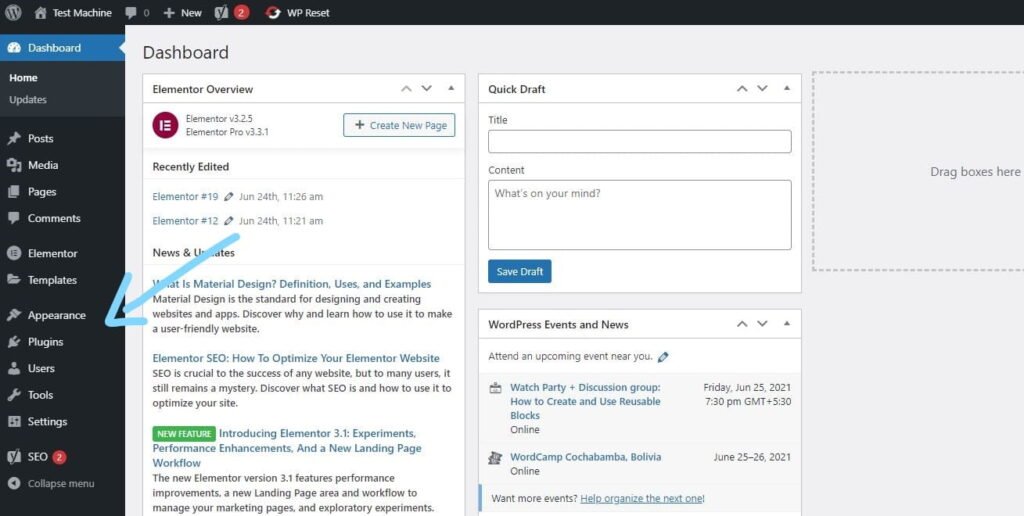
Step 2: From your WordPress dashboard, go to Appearance → Themes if you’re installing a theme, or navigate to Plugins if you’re installing a plugin.
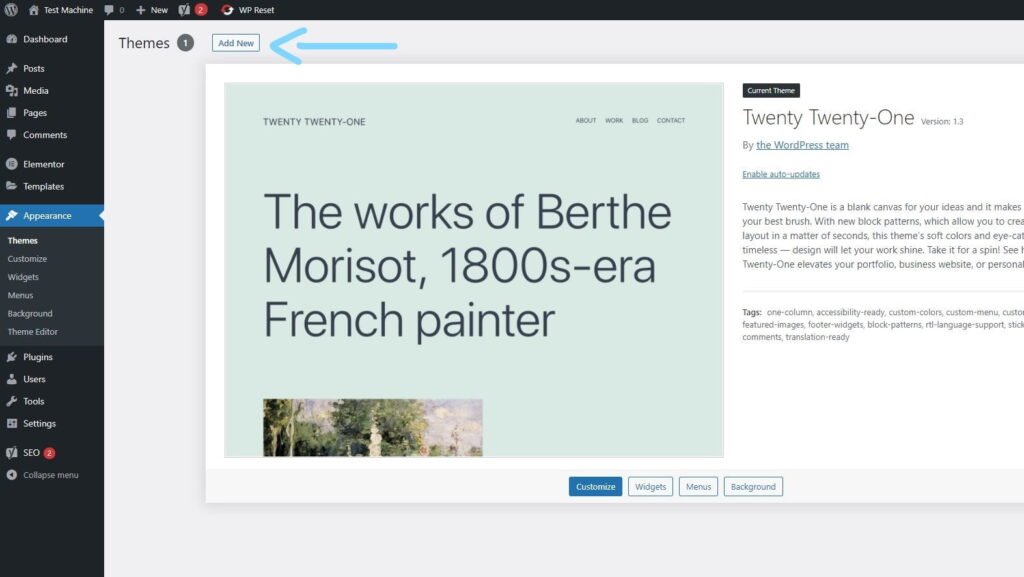
Step 3: Click the “Add New” button (this option is the same for both themes and plugins).
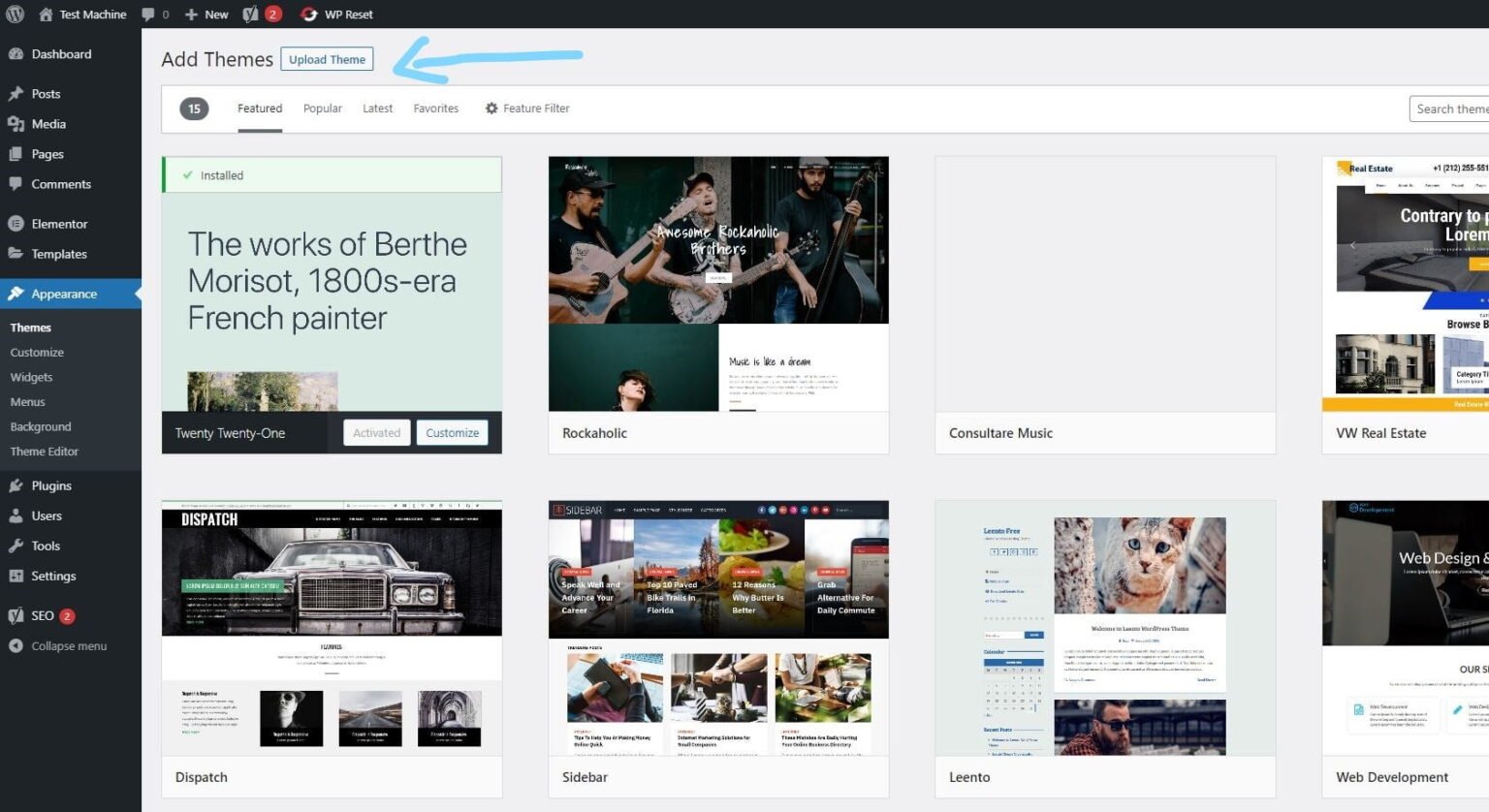
Step 4: Click “Upload Theme” if you’re installing a theme, or “Upload Plugin” if you’re in the plugins section.
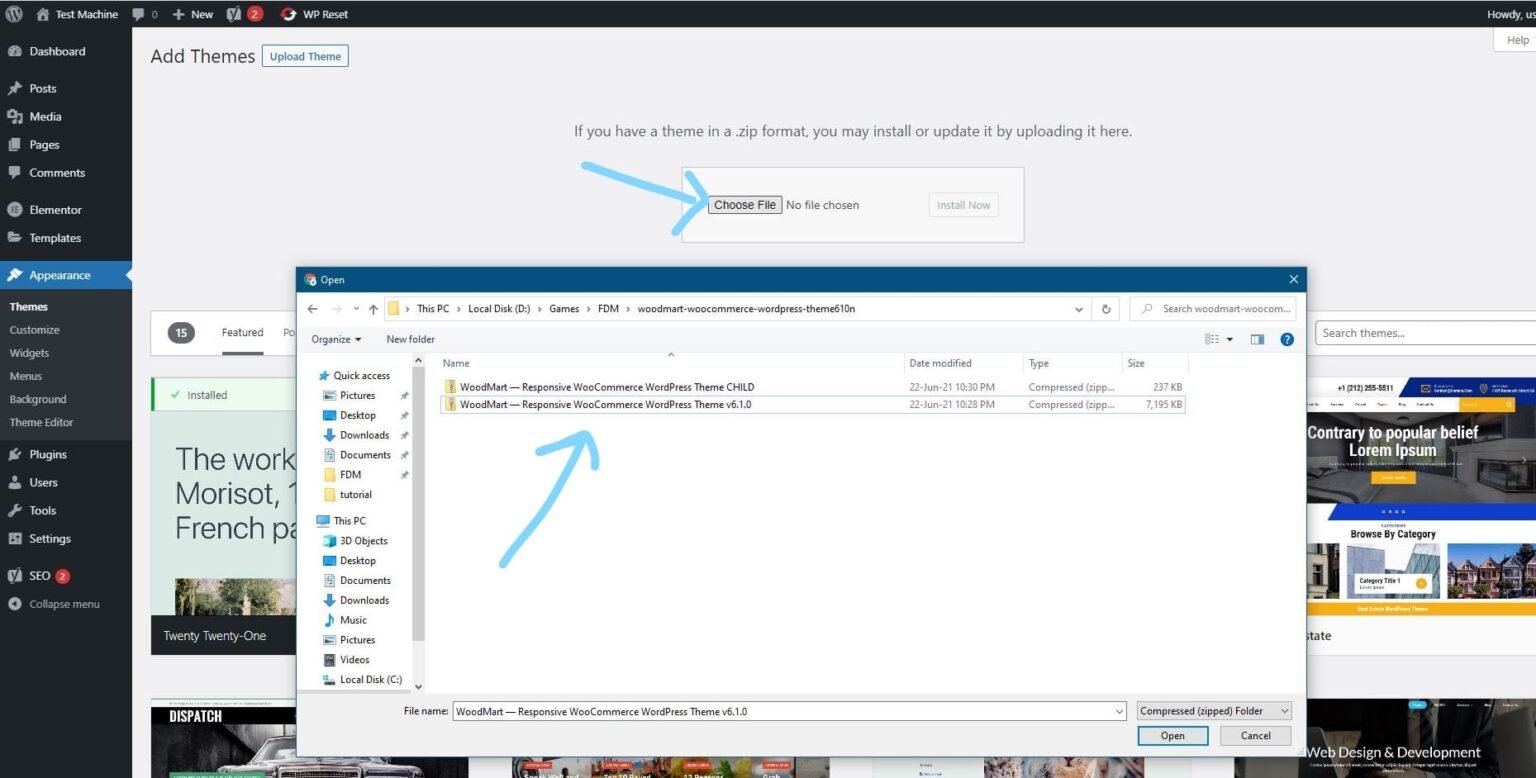
Step 5: Click “Choose File” and select the ZIP file of the theme or plugin you want to install.
Step 6: Click “Install Now.”
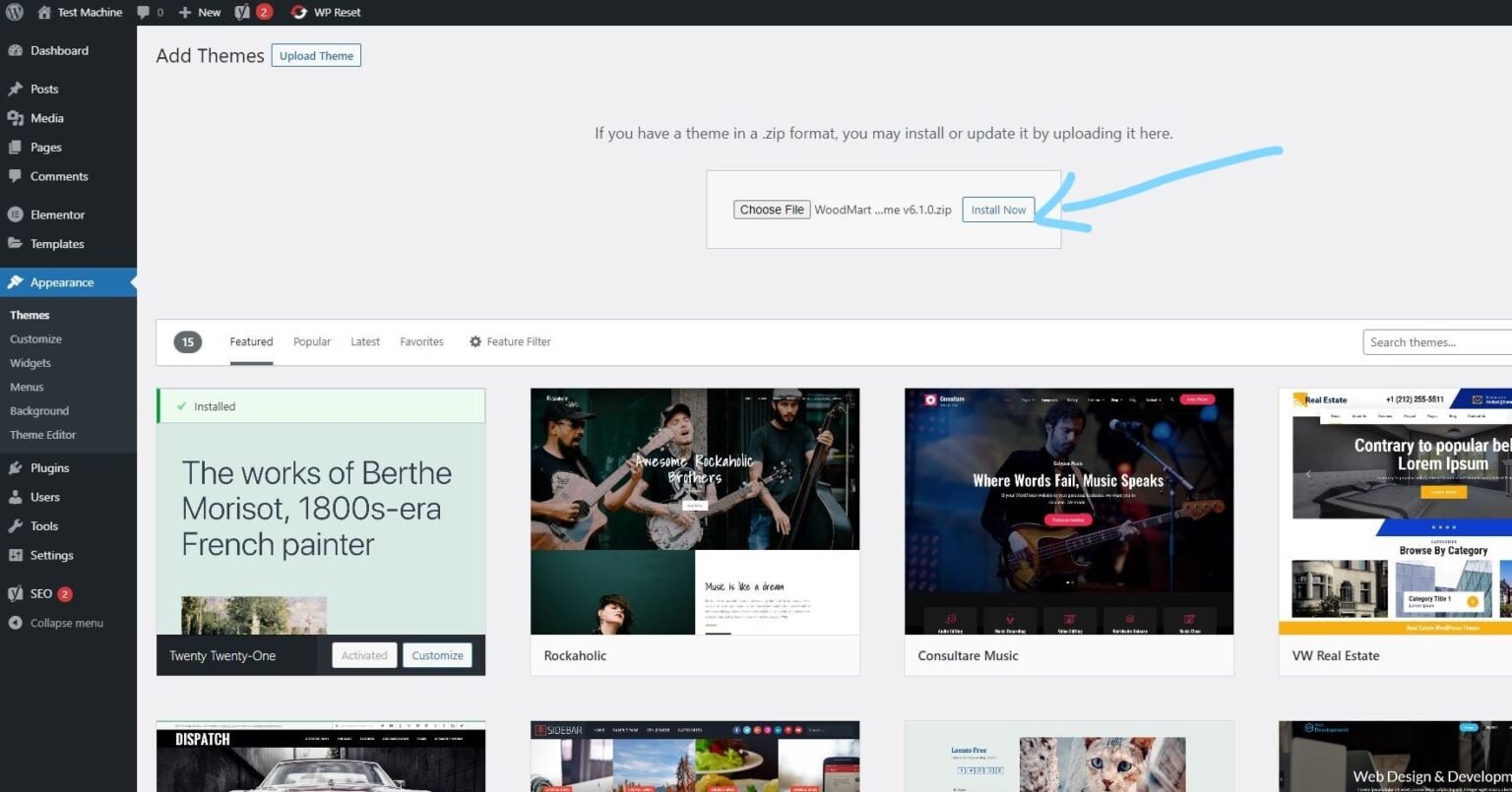
Step 7: The installation process will take a few seconds to complete.
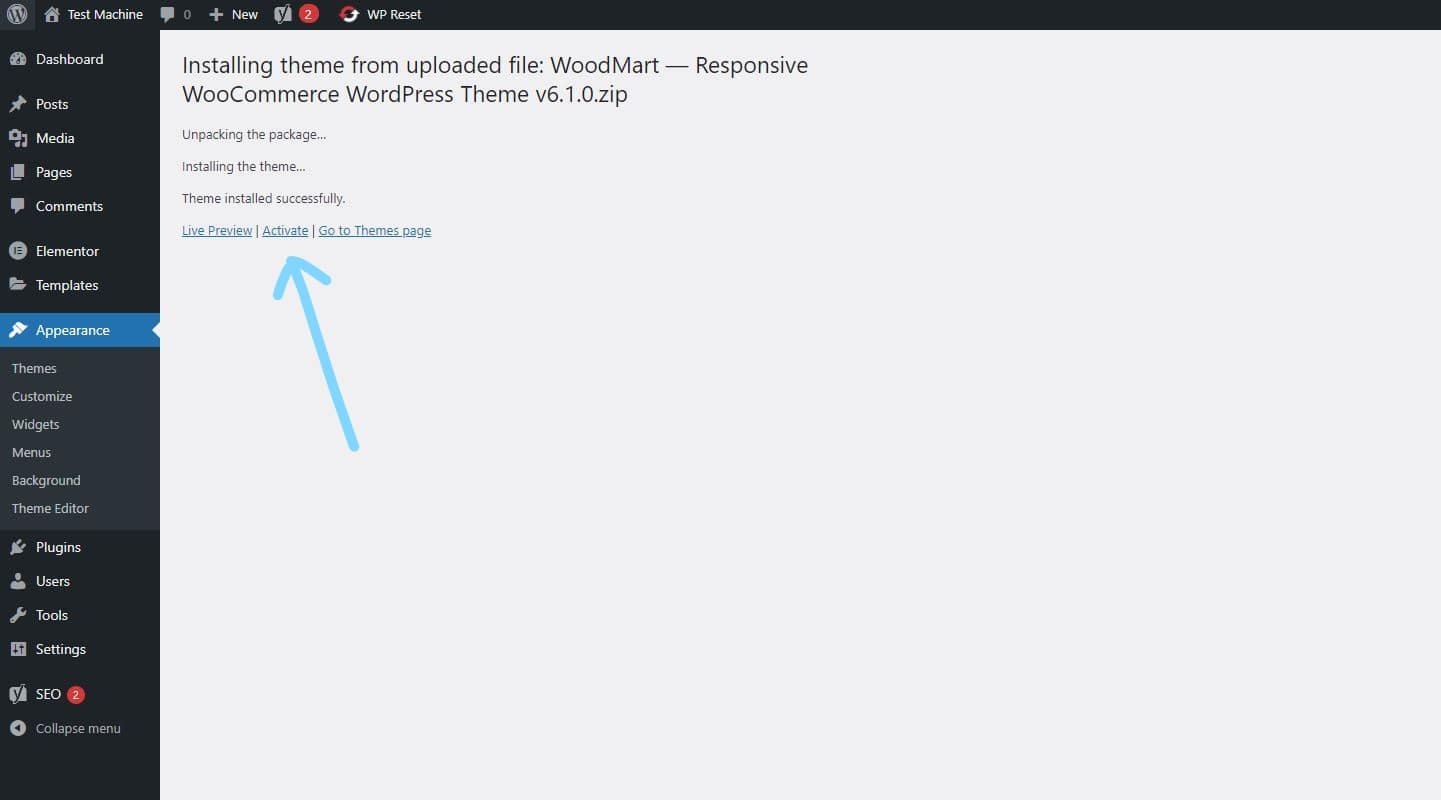
Step 8: Once the installation is complete, click “Activate” to manually activate your WordPress product.
How to Install Elementor Template Kits
Step 1: Download your template kit ZIP file. Do not unzip it.
Step 2: In WordPress, go to Settings → Permalinks and make sure Post Name is selected, then click Save.
Step 3: Navigate to Appearance → Themes → Add New and ensure Hello Elementor is installed and activated.
Step 4: If the theme prompts you to install the Elementor Page Builder plugin, click Install and then Activate.
Step 5: Go to Elementor → Settings, click the Features tab, and ensure the Flexbox Container shows a green icon. If not, set it to Active.
Step 6: Navigate to Plugins → Add New, search for Envato, and install and activate the Envato Elements – Photos & Elementor Templates plugin.
Note: If your kit requires Elementor Pro, make sure it is installed before continuing.
Step 7: Go to Elements → Installed Kits and click Upload Template Kit ZIP File. Your templates will now appear.
Step 8: Look for the orange banner at the top of the screen and click Install Requirements to load the necessary kit addons and settings.
That’s it! You’re now ready to start building your site.
-
Imported templates are stored in Elementor → Templates → Saved Templates and must be inserted into a new page in WordPress before customisation.
-
Imported blocks, tabs, or slides are also stored under Templates → Saved Templates and can be duplicated and customized directly.
-
Elementor Pro site parts are stored under Templates → Theme Builder and can be customized directly.
For detailed, step-by-step instructions with screenshots, copy and open the link below in a new tab.
How to Upload Install Elementor Template Kits from Themeforest to WordPress




Reviews
There are no reviews yet.